Loading
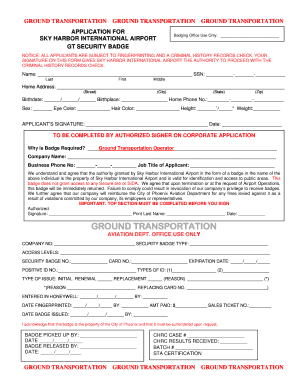
Get Phx Badgin Offic3
How it works
-

Open form follow the instructions
-

Easily sign the form with your finger
-

Send filled & signed form or save
How to fill out the Phx Badgin Offic3 online
The Phx Badgin Offic3 is an essential document for obtaining a security badge at Sky Harbor International Airport. This guide will walk you through the process of completing the form online, ensuring that you provide all necessary information accurately and efficiently.
Follow the steps to complete the Phx Badgin Offic3 online
- Click ‘Get Form’ button to obtain the form and open it in your editor.
- Begin by filling in your personal information. Enter your full name, including your last name, first name, and middle name.
- Provide your Social Security Number in the specified format.
- Fill out your home address, ensuring to include the street, city, state, and zip code.
- Indicate your birthdate and birthplace in the provided sections.
- Input your home phone number for contact purposes.
- Specify your sex, eye color, hair color, height, and weight in the relevant fields.
- Sign and date the application to confirm the accuracy of the information provided.
- If applicable, have the authorized signer complete their section, stating why the badge is required and providing the company name and business phone number.
- The authorized signer should also print their last name, sign, and indicate the date.
- Review all details for accuracy before finalizing your submission.
- After completing the form, save any changes, and you have the option to download, print, or share the form.
Complete your Phx Badgin Offic3 online today for a smooth application process.
TSA Cares Program Call 1-855-787-2227 or find out more. Download the MyTSA App on your smartphone for important TSA information at your fingertips.