Loading
Get Cinetopia Application
How it works
-

Open form follow the instructions
-

Easily sign the form with your finger
-

Send filled & signed form or save
How to fill out the Cinetopia application online
Filling out the Cinetopia application online is a straightforward process that allows you to apply for positions at Cinetopia conveniently. This guide will walk you through the sections of the application and provide detailed instructions for each part.
Follow the steps to complete your application online.
- Click the 'Get Form' button to access the Cinetopia application form and open it in your online editor.
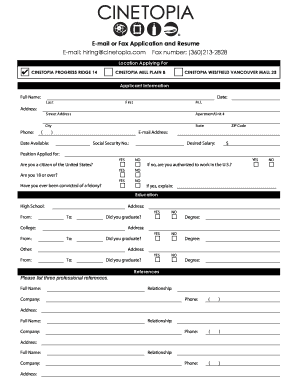
- Begin by specifying the location you are applying for from the options provided: Cinetopia Progress Ridge 14, Cinetopia Mill Plain 8, or Cinetopia Westfield Vancouver Mall 23.
- Enter your applicant information. Fill in your full name, address (including apartment/unit number, city, state, and ZIP code), phone number, email address, date available to start, social security number, desired salary, and position applied for.
- Answer the citizenship and legal eligibility questions. Indicate whether you are a citizen of the United States, if you are 18 years or older, and if you have ever been convicted of a felony. If you answered 'no' to being a citizen, provide an explanation of your work authorization.
- Provide your education details. List your high school, college, and any other educational experiences, including your address, dates attended, degrees earned, and whether you graduated.
- Input your references. List three professional references, including their full name, relationship to you, company, and phone number.
- Detail your availability for work. Specify your availability for each day of the week and any other relevant information.
- Describe your previous employment history. For each job, provide the company name, phone number, address, supervisor's name, job title, starting and ending salaries, responsibilities, dates employed, reason for leaving, and whether they can be contacted for a reference.
- If applicable, fill in information about your military service, including branch, rank at discharge, dates served, type of discharge, and any explanations if the discharge was other than honorable.
- Review the disclaimer and enter your signature and date, confirming that your answers are true and complete.
- Once you have completed the application, you can save your changes, download, print, or share the form as needed.
Start completing your Cinetopia application online today!