Loading
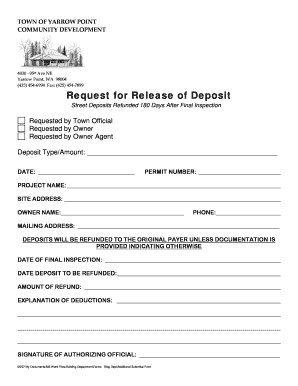
Get Deposit Release Form.doc. Variance Application Form
How it works
-

Open form follow the instructions
-

Easily sign the form with your finger
-

Send filled & signed form or save
How to use or fill out the Deposit Release Form.doc. Variance Application Form online
Filling out the Deposit Release Form is an important step in the process of refunding deposits after project completion. This guide will provide clear instructions on how to efficiently complete the form, ensuring that all necessary details are properly included.
Follow the steps to successfully complete the form.
- Click ‘Get Form’ button to obtain the form and open it in the editor.
- Identify the requester by selecting the appropriate option: 'Requested by Town Official,' 'Requested by Owner,' or 'Requested by Owner Agent.' Make sure to indicate your selection clearly.
- In the 'Deposit Type/Amount' field, clearly specify the type of deposit being refunded along with the total amount.
- Enter the 'DATE' when the request is being made in the format requested.
- Fill in the 'Permit Number' associated with the project for which the deposit was made.
- Provide the 'Project Name' that corresponds to the deposit being requested for refund.
- Include the 'Site Address' where the project was carried out.
- Fill in the 'Owner Name' of the individual or entity requesting the deposit refund.
- Indicate a contact 'Phone' number for any follow-up communication.
- Provide a complete 'Mailing Address' where the refund should be sent.
- Indicate the 'Date of Final Inspection' that occurred, necessary for processing the request.
- Specify the 'Date Deposit to be Refunded' which is generally determined after the final inspection.
- Clearly state the 'Amount of Refund' to be processed.
- In the 'Explanation of Deductions' field, provide any relevant details regarding deductions made from the deposit, if applicable.
- After completing all necessary fields, ensure that all information is accurate before signing the document. Obtain the 'Signature of Authorizing Official' where required.
- Once the form is completed, save any changes made. You may choose to download, print, or share the filled-out form as needed.
Complete your document online and ensure a smooth refund process.
Write neatly and legibly/type your application. State specifically why you need the variance, what your hardship is and why the Ordinance, which caused your denial unfairly affects you. Attach all relevant documents to your application. Avoid, if possible, submitting new documentation to the Board during the Hearing.
Industry-leading security and compliance
US Legal Forms protects your data by complying with industry-specific security standards.
-
In businnes since 199725+ years providing professional legal documents.
-
Accredited businessGuarantees that a business meets BBB accreditation standards in the US and Canada.
-
Secured by BraintreeValidated Level 1 PCI DSS compliant payment gateway that accepts most major credit and debit card brands from across the globe.