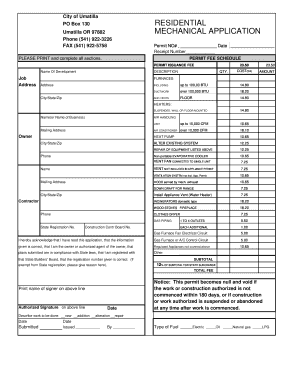
Get Residential Mechanical Application - City Of Umatilla - Umatilla-city
How it works
-

Open form follow the instructions
-

Easily sign the form with your finger
-

Send filled & signed form or save
How to fill out the RESIDENTIAL MECHANICAL APPLICATION - City Of Umatilla - Umatilla-city online
Filling out the residential mechanical application is an essential step for any individual or business undertaking mechanical work in Umatilla. This guide will provide a clear, step-by-step process to help you navigate the application effectively and ensure that all relevant information is submitted accurately.
Follow the steps to complete your application smoothly.
- Click ‘Get Form’ button to access the application document in an editable format.
- Begin by filling out the 'Permit No' and 'Date' sections at the top of the form. This helps identify your application and track its status.
- In the 'Name of Development' field, provide the name of your project or development for which this application is being submitted.
- Enter the 'Job Address' where the mechanical work is to be performed. Make sure to include the full address, including city, state, and zip code.
- In the 'Description' section, clearly outline the scope of work you intend to perform, such as installations or repairs.
- For each component listed in the fee schedule, provide the applicable quantities ('QTY') and calculate the total amounts. Ensure all quantities are accurate to avoid processing delays.
- Complete the contractor section, including the 'Name or Name of Business', 'Mailing Address', and 'Phone Number'. This identifies the responsible individual or business for the project.
- Sign and date the authorization section to confirm that you have read and understand the application terms, and that the information provided is accurate.
- Once all required fields are completed, save your changes. You can choose to download, print, or share the application for submission.
Start filling out your residential mechanical application online today to complete your project!
0:02 0:23 How To: Manual Line Breaks - YouTube YouTube Start of suggested clip End of suggested clip But sometimes you may not want the extra line you can add a manual line break by holding down theMoreBut sometimes you may not want the extra line you can add a manual line break by holding down the shift key as you hit Enter. This is how to add a manual. Line break.
Industry-leading security and compliance
-
In businnes since 199725+ years providing professional legal documents.
-
Accredited businessGuarantees that a business meets BBB accreditation standards in the US and Canada.
-
Secured by BraintreeValidated Level 1 PCI DSS compliant payment gateway that accepts most major credit and debit card brands from across the globe.