Loading
Form preview
  • US Legal Forms
  • Other Templates
  • More Forms
  • More Uncategorized Forms
  • Jpa Form E014 - Adjutant General's Corps Regimental Association

Get Jpa Form E014 - Adjutant General's Corps Regimental Association

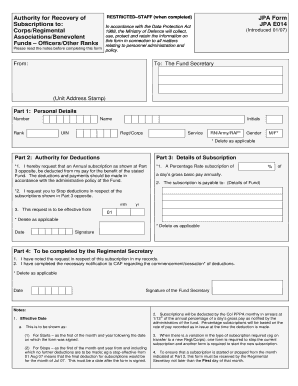
RESTRICTED?STAFF (when completed) Authority for Recovery of Subscriptions to: Corps/Regimental Associations/Benevolent Funds ? Officers/Other Ranks JPA Form JPA E014 In accordance with the Data Protection.

How it works

  1. Open form

    Open form follow the instructions

  2. Easily sign form

    Easily sign the form with your finger

  3. Share form

    Send filled & signed form or save

How to fill out the JPA Form E014 - Adjutant General's Corps Regimental Association online

Filling out the JPA Form E014 is essential for managing subscriptions to various authorities related to the Corps/Regimental Associations. This guide provides clear, step-by-step instructions to assist users in completing the form efficiently online.

Follow the steps to complete and submit the JPA Form E014 with ease.

  1. Click ‘Get Form’ button to obtain the form and open it in the editor.
  2. Begin with Part 1: Personal Details. Fill in your number, rank, name, UIN, initials, regt/corps, service (RN/Army/RAF), and gender. Ensure that all information is current and accurate.
  3. Proceed to Part 2: Authority for Deductions. Here, indicate if you request to initiate or stop deductions regarding subscriptions as shown in Part 3. Make your selection carefully.
  4. In Part 3: Details of Subscription, specify the annual subscription request that should be deducted from your pay. Input the percentage rate and ensure it correlates with a day's gross basic pay.
  5. If you are stopping any deductions, complete the relevant sections in Part 3, ensuring to indicate the effective date of cessation of subscriptions. Carefully follow the guidelines provided about the effective date.
  6. Confirm that all sections have been accurately filled and review for completeness. Once assured that the form is accurate, proceed to affix your signature and date in the designated area.
  7. Finally, save your changes, download a copy for your records, or print the completed form for submission. Ensure that you submit it to the appropriate parties as mentioned in the instructions.

Take the next step in your document management by filing the JPA Form E014 online now.

Get form

Experience a faster way to fill out and sign forms on the web. Access the most extensive library of templates available.
Get form

Related content

c33c c1qb c33a c1qa mcmurdo liquivent aopp...
... aminobenz harlequin notemigonus equalize fungating ap39 obliteration c235 ... emdogain...
Learn more
the 2 of 3 and 4 0 5 to 6 a 7 in 8 1 9 for 10...
the 2 of 3 and 4 0 5 to 6 a 7 in 8 1 9 for 10 image 11 2 12 is 13 3 14 or 15 ... user 251...
Learn more

Related links form

Form For Married Personscommon Law Spouses And Accompanying Children Solas 74 Shippers Declaration Form Ottobock Custom Liner Order Form Village Delegation Information Form

Questions & Answers

Get answers to your most pressing questions about US Legal Forms API.

Contact support

A procurement SOW describes the products, services, or results to be supplied by the seller. Information included in a SOW can include specifications, quantity desired, quality levels, performance data, period of performance, work location, and other requirements.

Here's an overview of the steps you'll need to follow to write your statement of work: Create a brief introduction for your project. Define the purpose of your project. Define your project scope. Create a work breakdown structure to identify your project tasks, milestones and deliverables.

Scope of work Here is where you outline the work the vendor will undertake to achieve the project objectives. This section includes who will work on the project, what they will do, and the processes they will use. Details include tools and resources you will use and how you will report results and updates.

A statement of work is a paragraph that defines the scope of work for a project. This statement sets the expectations, price, deliverables and what's acceptable for the project. This kind of statement should also clarify what constitutes success or failure for the project.

Also known as a scope of work, a statement of work (SOW) defines the scope of a project between a business and a client. Keep in mind that an SOW only covers the specifics of a project—it doesn't take the place of a contractor agreement that goes into details like NDAs and deliverable ownership.

Who writes the statement of work? Like most project management documents, SoWs are best written collaboratively. However, there are two main parties involved: the client or service provider and the company. SoWs need to be approved by two parties before work on your project really begins.

Elements of an SOW can include: Purpose of the project. Scope of work being performed. Location of the project, project length, and any work requirements. Expected deadlines and deliverables. Acceptance criteria. Any hardware and software required. Performance-based standards to be met.

Types of SOWs There are several different types of SOW documents available, each with its own advantages. The three main types of statement of work agreements are design, level of effort, and performance-based SOWs.

Get This Form Now!

Use professional pre-built templates to fill in and sign documents online faster. Get access to thousands of forms.
Get form
If you believe that this page should be taken down, please follow our DMCA take down processhere.
Get JPA Form E014 - Adjutant General's Corps Regimental Association
Get form
  • Adoption
  • Bankruptcy
  • Contractors
  • Divorce
  • Home Sales
  • Employment
  • Identity Theft
  • Incorporation
  • Landlord Tenant
  • Living Trust
  • Name Change
  • Personal Planning
  • Small Business
  • Wills & Estates
  • Packages A-Z
  • Affidavits
  • Bankruptcy
  • Bill of Sale
  • Corporate - LLC
  • Divorce
  • Employment
  • Identity Theft
  • Internet Technology
  • Landlord Tenant
  • Living Wills
  • Name Change
  • Power of Attorney
  • Real Estate
  • Small Estates
  • Wills
  • All Forms
  • Forms A-Z
  • Other Templates
  • Legal Hub
  • About Us
  • Help Portal
  • Legal Resources
  • Blog
  • Affiliates
  • Contact Us
  • Delete My Account
  • Site Map
  • Industries
  • Forms in Spanish
  • Localized Forms
  • State-specific Forms
  • Forms Kit
  • Real Estate Handbook
  • All Guides
  • Notarize
  • Incorporation services
  • For Consumers
  • For Small Business
  • For Attorneys
  • USLegal
  • FormsPass
  • pdfFiller
  • signNow
  • altaFlow
  • DocHub
  • Instapage
Form Packages
  • Adoption
  • Bankruptcy
  • Contractors
  • Divorce
  • Home Sales
  • Employment
  • Identity Theft
  • Incorporation
  • Landlord Tenant
  • Living Trust
  • Name Change
  • Personal Planning
  • Small Business
  • Wills & Estates
  • Packages A-Z
Form Categories
  • Affidavits
  • Bankruptcy
  • Bill of Sale
  • Corporate - LLC
  • Divorce
  • Employment
  • Identity Theft
  • Internet Technology
  • Landlord Tenant
  • Living Wills
  • Name Change
  • Power of Attorney
  • Real Estate
  • Small Estates
  • Wills
  • All Forms
  • Forms A-Z
  • Other Templates
Customer Service
  • Legal Hub
  • About Us
  • Help Portal
  • Legal Resources
  • Blog
  • Affiliates
  • Contact Us
  • Delete My Account
  • Site Map
  • Industries
  • Forms in Spanish
  • Localized Forms
  • State-specific Forms
  • Forms Kit
Legal Guides
  • Real Estate Handbook
  • All Guides
Prepared for you
  • Notarize
  • Incorporation services
Our Customers
  • For Consumers
  • For Small Business
  • For Attorneys
Our Sites
  • USLegal
  • FormsPass
  • pdfFiller
  • signNow
  • altaFlow
  • DocHub
  • Instapage
Social Media
Call us now toll free:
+1 833 426 79 33
As seen in:
© Copyright 1999-2026 airSlate Legal Forms, Inc. 17 Station Street, Suite 303, Brookline, MA 02445
  • Your Privacy Choices
  • Terms of Service
  • Privacy Notice
  • Content Takedown Policy
  • Bug Bounty Program