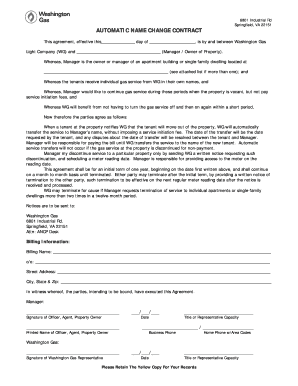
Apacity / Business Phone Home Phone w/Area Codes Washington Gas: Signature of Washington Gas Representative / / Date Title or Representative Capacity Please Retain The Yellow Copy For Your Records.
Open form follow the instructions
Easily sign the form with your finger
Send filled & signed form or save
How to fill out the Washington Gas Automatic Name Change online
This guide provides clear instructions on how to complete the Washington Gas Automatic Name Change form efficiently. By following these steps, you can ensure that the automatic transfer of gas service is handled smoothly and without complications.
Follow the steps to complete the form online effectively.
- Click ‘Get Form’ button to access the document and open it in your preferred editing tool.
- Fill in the effective date of the agreement. This is the date when the agreement will start and should reflect a clear understanding between the parties involved.
- Complete the section regarding the Manager or Owner of the Property. Include the full name of the person or entity responsible for managing the property.
- Specify the property address where the services will be provided. If there are multiple properties, refer to the attached list, if applicable.
- In the billing information section, enter the billing name, which can be the same as the Manager's name or another designated individual.
- Provide the c/o name if necessary, followed by the complete street address, city, state, and zip code for accurate billing purposes.
- Ensure that the signature of the Officer, Agent, or Property Owner is added, along with their printed name and the date of the signature.
- Include the title or representative capacity for clarity and confirm the business and home phone numbers to maintain communication.
- After verifying all information, proceed to save changes, download, print, or share the completed form as needed.
Complete your Washington Gas Automatic Name Change form online today for a hassle-free experience.
Experience a faster way to fill out and sign forms on the web. Access the most extensive library of templates available.
Related content
Nov 29, 2017 — Gas Bill. 101 Constitution Avenue, NW. Washington, DC 20080 ... Thanks...
gas r from area rgency, meter. r e- e e. - ers call offers or sto- ur name to iden- ard. e...
Exxon Mobil Corporation, doing business as ExxonMobil, is an American multinational oil...
Get answers to your most pressing questions about US Legal Forms API.
What is automatic name change Washington Gas?
Through the Automatic Name Change Program (ANCP), Washington Gas and property managers and /or landlords establish a written agreement for transfer of a tenant's gas service to the landlord when a tenant informs Washington Gas that he or she is moving.
What does Washington Gas do?
Providing safe and reliable delivery of natural gas to all of its customers and responding around the clock to any natural gas emergency. Reading customers' meters and providing billing services.
Where can I pay my Washington gas bill?
Washington Gas offers multiple convenient ways to pay your monthly bill....Participating retail stores: 7-Eleven. CVS. Ace Cash Express. Family Dollar.
How do I set up autopay?
0:11 1:51 How to Set Up Automatic Payments - YouTube YouTube Start of suggested clip End of suggested clip Look for the phone number for online help normally on the same page. Step. 4 provide the payees nameMoreLook for the phone number for online help normally on the same page. Step. 4 provide the payees name address. And account number that you will find on your bill.
Does Washington Gas have autopay?
Pay your bill automatically every month through the Automated Payment Plan. Washington Gas will continue to bill you each month, but, on your payment due date, the bill amount will be automatically deducted from your checking account which will avoid the need for check writing, postage and/or waiting in line.
How do I set up autopay for Washington Gas?
To enroll in the Automated Payment Plan, simply fill out and return the short enrollment application in our Payment Plans & Services Brochure. Please note: You must continue to pay by check until you see a message on the payment stub portion of your bill that reads "Automated Payment Plan."
How do I set up a new service with Washington Gas?
To begin the start/stop service process, please contact us by: Calling 844-WASHGAS (927-4427) to speak with a Customer Service representative. Submitting the required information online to start or stop natural gas service, safe and securely.
Use professional pre-built templates to fill in and sign documents online faster. Get access to thousands of forms.
If you believe that this page should be taken down, please follow our DMCA take down process here.