Loading
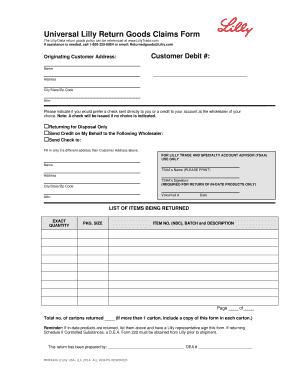
Get Universal Lilly Return Goods Claims Form - Lillytrade.com
How it works
-

Open form follow the instructions
-

Easily sign the form with your finger
-

Send filled & signed form or save
How to fill out the Universal Lilly Return Goods Claims Form - LillyTrade.com online
Filling out the Universal Lilly Return Goods Claims Form online can be straightforward when you understand the required information. This guide will provide step-by-step instructions to help you navigate the form with ease.
Follow the steps to complete the form successfully.
- Click the ‘Get Form’ button to access the Universal Lilly Return Goods Claims Form and open it in your selected format.
- Begin by entering the originating customer address. Provide the customer debit number and the name of the individual submitting the claim. Ensure that all fields are accurately filled to avoid delays.
- Complete the address fields, including city, state, and zip code. If there is a different address where the check should be sent, indicate it in the provided section.
- Choose how you would like the return processed. Indicate if you prefer a check sent directly to you or a credit to your account at the wholesaler. Mark the appropriate box clearly.
- If applicable, provide the name and address for the wholesaler to whom the credit should be sent. Include this section only if it differs from the customer address listed earlier.
- For returns that need a signature from the Lilly Trade and Specialty Account Advisor (TSAA), ensure that this section is completed subsequently. Print the TSAA’s name and obtain the required signature if returning in-date products.
- List the items you are returning. Fill out the exact quantity, package size, item number (NDC), batch, and description for each item being returned. Make sure this information is complete and accurate.
- Include the total number of cartons being returned. If you are submitting multiple cartons, remember to include a copy of the completed form in each carton.
- If you are returning Schedule II Controlled Substances, make sure to obtain a D.E.A. Form 222 from Lilly prior to shipment.
- Finally, check the form for completeness and accuracy. You can then choose to save the changes, download, print, or share the form as necessary.
Start filling out your claims form online now!