Loading
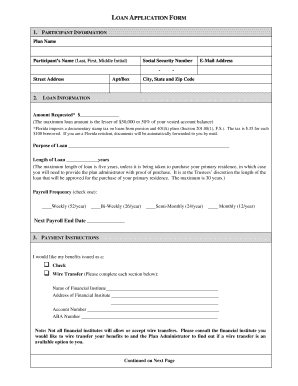
Get Loan Form - The Pension Studio
How it works
-

Open form follow the instructions
-

Easily sign the form with your finger
-

Send filled & signed form or save
How to fill out the Loan Form - The Pension Studio online
Filling out the Loan Form - The Pension Studio online is a straightforward process that allows individuals to request a loan against their pension plan. This guide provides step-by-step instructions to ensure that you accurately complete each section of the form.
Follow the steps to effectively fill out the Loan Form online.
- Click 'Get Form' button to obtain the document and open it for editing.
- Enter your participant information in the provided fields. Include the plan name, your full name (last, first, middle initial), social security number, street address, apartment or box number, email address, city, state, and zip code.
- In the loan information section, input the amount you are requesting. Remember that the maximum loan amount is the lesser of $50,000 or 50% of your vested account balance. If you reside in Florida, be aware of the documentary stamp tax that applies to your loan amount.
- Specify the purpose of the loan and indicate the desired length of the loan in years. Note that the maximum duration is five years unless the loan is for purchasing a primary residence, which can extend to a maximum of 30 years, subject to approval.
- Choose your payroll frequency by checking the appropriate box for weekly, bi-weekly, semi-monthly, or monthly. Enter the next payroll end date as indicated on your pay schedule.
- In the payment instructions section, select how you would like your benefits issued. If you choose wire transfer, make sure to fill out the name and address of the financial institution, your account number, and the ABA number.
- Review the participant certification section and affirm that there are no qualified domestic relation orders (QDRO) affecting your loan ability. Acknowledge your responsibility for any applicable fees or taxes associated with the loan request.
- Sign and date the form in the participant signature area.
- If applicable, the employer authorization section must be completed by the plan administrator. They will indicate whether they authorize or do not authorize the loan request.
- Once all sections are completed, ensure to save any changes made to the document. You may then choose to download, print, or share the completed form as needed.
Begin filling out your Loan Form online today to take advantage of your pension plan benefits.
A 401(k) loan allows you to take out a loan against your own 401(k) retirement account, or essentially borrow money from yourself. While you'll pay interest similar to a more traditional loan, the interest payments go back into your account so you'll be paying interest to yourself.