Loading
Form preview
  • US Legal Forms
  • Form Library
  • More Forms
  • More Uncategorized Forms
  • Figure 3 : A Sample Post-interview Note-taking Form Name ...

Get Figure 3 : A Sample Post-interview Note-taking Form Name ...

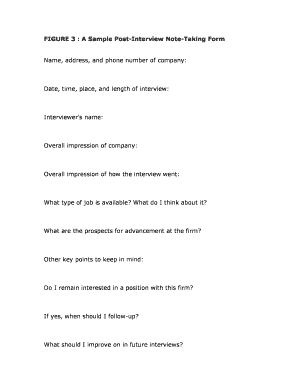
FIGURE 3 : A Sample Post-Interview Note-Taking Form. Name, address, and phone number of company: Date, time, place, and length of interview: Interviewer's .

How it works

  1. Open form

    Open form follow the instructions

  2. Easily sign form

    Easily sign the form with your finger

  3. Share form

    Send filled & signed form or save

How to use or fill out the FIGURE 3: A Sample Post-Interview Note-Taking Form online

Filling out the FIGURE 3 sample post-interview note-taking form effectively can help you capture crucial details about your interview experience. This guide will walk you through each section of the form to ensure you provide comprehensive notes that will serve you well in future job prospects.

Follow the steps to fill out the post-interview note-taking form accurately.

  1. Click the ‘Get Form’ button to access the form and open it in your preferred editor.
  2. In the first section, enter the name, address, and phone number of the company you interviewed with. This information helps you keep track of where you applied and reflects your organizational skills.
  3. Record the date, time, place, and duration of the interview. This section is essential for recalling specific details regarding when you spoke with the employer.
  4. Fill in the interviewer's name. Knowing who interviewed you can provide clarity in future communications and follow-ups.
  5. Provide your overall impression of the company. Reflect on your feelings about the company culture, values, and environment during your visit.
  6. Assess your overall impression of how the interview went. This is a space for you to note the highlights and any concerns you may have had during the discussion.
  7. Describe the type of job available and your thoughts on it. This will help clarify whether the role aligns with your career aspirations.
  8. Consider the prospects for advancement within the firm. Evaluate if this company offers the growth opportunities you seek.
  9. Note any other key points you want to remember. This might include specific remarks from the interviewer or unique aspects of the workplace.
  10. Decide if you remain interested in a position with this firm. Documenting this will inform your next steps in the job application process.
  11. If you remain interested, indicate when you should follow up. Setting a timeline can enhance your chances of staying in the employer's considerations.
  12. Reflect on what you should improve on in future interviews. This is crucial for your personal and professional development.
  13. Once all sections are filled out, ensure to save your changes. You can then download, print, or share this form for your records or further use.

Start completing your post-interview note-taking form online to enhance your job search process!

Get form

Experience a faster way to fill out and sign forms on the web. Access the most extensive library of templates available.
Get form

Related content

Toolkit for Making Written Material Clear and...
SECTION 3: Methods for testing written material with readers ... List of figures in this...
Learn more
A Guide to Behavioral Interviewing - SHRM
Section 3: What to do After Conducting a Behavioral Interview . ... template for creating...
Learn more
List of narrative techniques - Wikipedia
A narrative technique is any of several specific methods the creator of a narrative uses...
Learn more

Related links form

Sheraton Credit Card Authorization Form Vinnapas 5105 Guest Room Registration Forms Rda1846s Datasheet

Questions & Answers

Get answers to your most pressing questions about US Legal Forms API.

Contact support

An A record maps a domain to the physical IP address of the computer hosting that domain. Internet traffic uses the A record to find the computer hosting your domain's DNS settings. The value of an A record is always an IP address, and multiple A records can be configured for one domain name.

So, to summarize, A Records point directly to IP addresses, while CNAMEs point to A Records. MX records point to mail servers and help route emails to their proper destinations.

There is no separate rule for retention of email records. Records retention schedules provide the following guidance about email: “Electronic mail is just as much a record as any traditional paper record, and must be treated in the same ways.

PTR record This can affect email delivery because it's used to verify the authenticity of the sender's domain name. Email servers do this by using PTR records to perform a reverse DNS lookup to verify that the corresponding domain name matches the domain name used in the email message's “From” address.

The A stands for “Address,” and it's used to point a domain name to an IP address or host. You can only use an A record when you want to point to an IPv4 address. An AAAA record is required if you wish to direct your domain to an IPv6 address.

An "A" record maps a name to an address. You will first need an A record for your mailserver. Your static IP address from your ISP was the first step, of course. For example, you might log into the web portal for the example.com domain and create an "A" record for "mail" for 192.0.

No, email would not be affected. The only situation where changing an A record would affect email was if you were changing an A record like mail.example.com which your MX records were pointing at.

An A record is a host record. An A record doesn't tell email servers where to send email, even if the A record is mail.yourdomain.com. You need an MX record to tell email servers where to send email for your domain. Note that your MX can "point" to any A record.

Get This Form Now!

Use professional pre-built templates to fill in and sign documents online faster. Get access to thousands of forms.
Get form
If you believe that this page should be taken down, please follow our DMCA take down processhere.

Industry-leading security and compliance

US Legal Forms protects your data by complying with industry-specific security standards.
  • In businnes since 1997
    25+ years providing professional legal documents.
  • Accredited business
    Guarantees that a business meets BBB accreditation standards in the US and Canada.
  • Secured by Braintree
    Validated Level 1 PCI DSS compliant payment gateway that accepts most major credit and debit card brands from across the globe.
Get FIGURE 3 : A Sample Post-Interview Note-Taking Form Name ...
Get form
  • Adoption
  • Bankruptcy
  • Contractors
  • Divorce
  • Home Sales
  • Employment
  • Identity Theft
  • Incorporation
  • Landlord Tenant
  • Living Trust
  • Name Change
  • Personal Planning
  • Small Business
  • Wills & Estates
  • Packages A-Z
  • Affidavits
  • Bankruptcy
  • Bill of Sale
  • Corporate - LLC
  • Divorce
  • Employment
  • Identity Theft
  • Internet Technology
  • Landlord Tenant
  • Living Wills
  • Name Change
  • Power of Attorney
  • Real Estate
  • Small Estates
  • Wills
  • All Forms
  • Forms A-Z
  • Form Library
  • Legal Hub
  • About Us
  • Help Portal
  • Legal Resources
  • Blog
  • Affiliates
  • Contact Us
  • Delete My Account
  • Site Map
  • Industries
  • Forms in Spanish
  • Localized Forms
  • State-specific Forms
  • Forms Kit
  • Real Estate Handbook
  • All Guides
  • Notarize
  • Incorporation services
  • For Consumers
  • For Small Business
  • For Attorneys
  • USLegal
  • FormsPass
  • pdfFiller
  • signNow
  • altaFlow
  • DocHub
  • Instapage
Form Packages
  • Adoption
  • Bankruptcy
  • Contractors
  • Divorce
  • Home Sales
  • Employment
  • Identity Theft
  • Incorporation
  • Landlord Tenant
  • Living Trust
  • Name Change
  • Personal Planning
  • Small Business
  • Wills & Estates
  • Packages A-Z
Form Categories
  • Affidavits
  • Bankruptcy
  • Bill of Sale
  • Corporate - LLC
  • Divorce
  • Employment
  • Identity Theft
  • Internet Technology
  • Landlord Tenant
  • Living Wills
  • Name Change
  • Power of Attorney
  • Real Estate
  • Small Estates
  • Wills
  • All Forms
  • Forms A-Z
  • Form Library
Customer Service
  • Legal Hub
  • About Us
  • Help Portal
  • Legal Resources
  • Blog
  • Affiliates
  • Contact Us
  • Delete My Account
  • Site Map
  • Industries
  • Forms in Spanish
  • Localized Forms
  • State-specific Forms
  • Forms Kit
Legal Guides
  • Real Estate Handbook
  • All Guides
Prepared for you
  • Notarize
  • Incorporation services
Our Customers
  • For Consumers
  • For Small Business
  • For Attorneys
Our Sites
  • USLegal
  • FormsPass
  • pdfFiller
  • signNow
  • altaFlow
  • DocHub
  • Instapage
Social Media
Call us now toll free:
+1 833 426 79 33
As seen in:
© Copyright 1999-2026 airSlate Legal Forms, Inc. 3720 Flowood Dr, Flowood, Mississippi 39232
  • Your Privacy Choices
  • Terms of Service
  • Privacy Notice
  • Content Takedown Policy
  • Bug Bounty Program