Loading
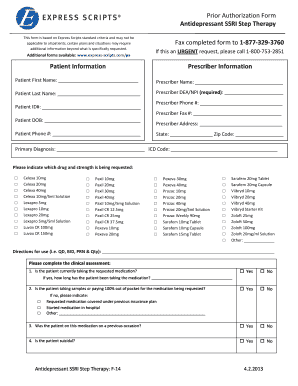
Get Prescriber Information Fax Completed Form To 1 ... - Express Scripts
How it works
-

Open form follow the instructions
-

Easily sign the form with your finger
-

Send filled & signed form or save
How to fill out the Prescriber Information Fax Completed Form To 1 ... - Express Scripts online
This guide provides a comprehensive overview of how to accurately complete the Prescriber Information Fax Completed Form for Express Scripts. By following these instructional steps, you will ensure the form is filled out correctly and submitted efficiently.
Follow the steps to complete the form accurately.
- Click the ‘Get Form’ button to acquire the form and open it in your editing application.
- Begin by entering the patient's information in the designated fields, including their first name, last name, date of birth, patient ID number, and phone number.
- Next, provide the prescriber’s information. Fill in their name, DEA/NPI number, phone number, fax number, and complete the address fields including state and zip code.
- Indicate the primary diagnosis and provide the corresponding ICD code for the condition being treated.
- Select the specific antidepressant medication and strength being requested from the provided options by marking the appropriate checkbox.
- Clearly articulate the directions for use (i.e., dosage frequency and quantity) in the space provided.
- Complete the clinical assessment questions. Ensure that each question is answered accurately to provide a complete picture of the patient's treatment history.
- Detail any other generic SSRIs the patient has tried by checking the relevant boxes.
- In the comments section, share any additional diagnoses, symptoms, or critical information that may aid in the review process.
- Finalize by signing the form with the prescriber’s signature and date. Include the office contact name and phone number for any follow-up queries.
- After completing the form, ensure to save the changes. You have the option to download, print, or share the completed form as needed.
Start filling out the required documents online now for a seamless submission process.
Related links form
To start, enter the pharmacy's fax number. Next, fill out the rest of the required details. You can also type a custom message or insert an electronic signature. Find the attachment space, then drag and drop a copy of your prescription.