Loading
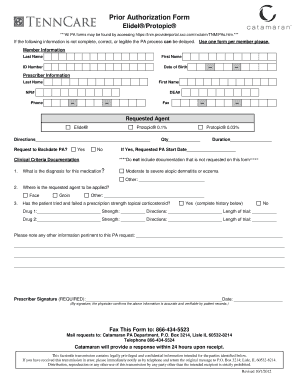
Get General/non-preferred Drug Prior Authorization Form - Catamaran
How it works
-

Open form follow the instructions
-

Easily sign the form with your finger
-

Send filled & signed form or save
How to fill out the General/Non-Preferred Drug Prior Authorization Form - Catamaran online
The General/Non-Preferred Drug Prior Authorization Form - Catamaran is an essential document for ensuring that specific medications are approved for coverage based on individual health needs. This guide will walk you through the process of filling out the form online, ensuring that all necessary information is accurately completed.
Follow the steps to successfully complete the General/Non-Preferred Drug Prior Authorization Form.
- Click ‘Get Form’ button to access the Prior Authorization Form and open it in the online editor.
- Fill in the member information section. Enter the member's last name, first name, ID number, and date of birth accurately to avoid delays in processing.
- Complete the prescriber information section. Include the prescriber's last name, first name, NPI number, DEA number, phone number, and fax number.
- In the requested agent section, indicate the medication being requested, such as ® or ® 0.1%. Provide directions for use.
- If backdating the prior authorization (PA) is needed, indicate 'yes' or 'no' and, if yes, provide the requested PA start date.
- In the clinical criteria documentation, specify the diagnosis for the medication. You can select 'moderate to severe atopic dermatitis or eczema' or provide another diagnosis.
- Indicate where the requested medication will be applied, such as the face or groin, including other areas if necessary.
- Complete the section regarding the patient's prior use of prescription strength topical corticosteroids. If applicable, list the drugs used, their strengths, directives, and the length of the trial.
- Provide any additional, pertinent information related to the prior authorization request.
- Have the prescriber sign and date the form, confirming that the information is accurate and can be verified.
- Submit the completed form by faxing it to 866-434-5523 or mailing it to the Catamaran PA Department at the specified address.
- After submission, expect a response from Catamaran within 24 hours.
Complete your prior authorization request online to ensure timely approval and access to necessary medications.
In summary “Refill too soon” rejections happen because a patient is trying to get their medication before the payer believes it is time. In some cases, the pharmacist can override the rejection.
Industry-leading security and compliance
US Legal Forms protects your data by complying with industry-specific security standards.
-
In businnes since 199725+ years providing professional legal documents.
-
Accredited businessGuarantees that a business meets BBB accreditation standards in the US and Canada.
-
Secured by BraintreeValidated Level 1 PCI DSS compliant payment gateway that accepts most major credit and debit card brands from across the globe.