Loading
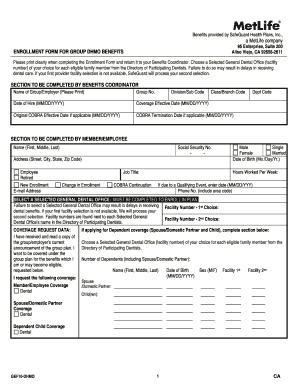
Get Enrollment Form For Group Dhmo Benefits A Metlife ...
How it works
-

Open form follow the instructions
-

Easily sign the form with your finger
-

Send filled & signed form or save
How to fill out the enrollment form for group DHMO benefits a MetLife online
Filling out the enrollment form for group DHMO benefits can seem daunting, but with the right guidance, you can complete it effortlessly. This guide provides step-by-step instructions to help you fill out the form accurately and efficiently online.
Follow the steps to successfully complete your enrollment form.
- Press the 'Get Form' button to access the enrollment form and open it in your desired editing tool.
- Begin by filling out the section designated for the benefits coordinator. Include the name of your group/employer, group number, and any relevant codes or dates as requested.
- Proceed to the section for the member/employee. Fill in your name, social security number, address, job title, and any relevant enrollment types such as new enrollment or change in enrollment.
- Indicate your marital status and date of birth, as well as the number of hours you work each week. If applicable, provide the date of any qualifying event.
- Select a general dental office from the directory provided, including facility numbers for both your first and second choices. This step is crucial as failing to make a selection may delay your dental benefits.
- Complete the coverage request data. Acknowledge that you have received and read the group plan details and specify the coverage needed, such as member/employee dental coverage or dependent coverage.
- If applying for dependent coverage, fill in the details of each dependent, including their name, date of birth, sex, and their selected dental office information.
- In the declaration section, ensure all statements are true and complete. By signing, you confirm your understanding of the covered conditions, payroll deductions, and authorization for dental records.
- Finally, sign the form, print your name, and date it. Review all entries for accuracy before submitting.
- Once completed, save your changes, and download, print, or share the enrollment form as needed.
Complete your enrollment form online today to ensure you receive your dental benefits promptly.
Choose MetLife Benefits We offer: No waiting periods for major procedures (except for Orthodontia in high plan which has a 24‐month waiting period) Competitive pricing. Discounted In‐Network Dentist fees.
Industry-leading security and compliance
US Legal Forms protects your data by complying with industry-specific security standards.
-
In businnes since 199725+ years providing professional legal documents.
-
Accredited businessGuarantees that a business meets BBB accreditation standards in the US and Canada.
-
Secured by BraintreeValidated Level 1 PCI DSS compliant payment gateway that accepts most major credit and debit card brands from across the globe.