Loading
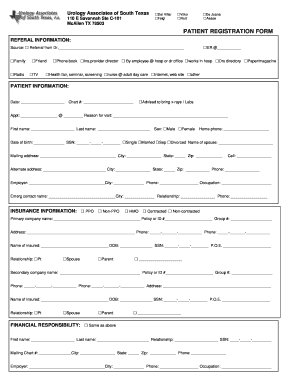
Get Patient Registration/encounter Form - Urology Associates Of South ...
How it works
-

Open form follow the instructions
-

Easily sign the form with your finger
-

Send filled & signed form or save
How to fill out the Patient Registration/Encounter Form - Urology Associates Of South online
Completing the Patient Registration/Encounter Form is an essential step in ensuring you receive the appropriate care. This guide provides clear, step-by-step instructions for filling out the form online, making the process efficient and straightforward.
Follow the steps to complete your registration form effortlessly.
- Click ‘Get Form’ button to obtain the form and open it in the editor.
- Begin by filling in the referral information section. Indicate the source of your referral by checking the appropriate box, and if applicable, provide the name of the referring doctor.
- In the patient information section, enter the date of completion, your patient chart number, appointment details, and reason for your visit. Ensure to fill in personal details such as first and last name, sex, home and cell phone numbers, date of birth, and marital status.
- Provide your mailing address, including city, state, and zip code. If you have an alternate address, fill it in alongside the corresponding phone number.
- Fill out your employment information, including employer's name, city, phone number, and occupation.
- Complete the emergency contact information by providing the contact's name, city, relationship to you, and phone number.
- In the insurance information section, indicate whether you have PPO, HMO, or other types of insurance. For each insurance provider, fill out the required details including policy numbers and the insured person's name and relationship to you.
- For financial responsibility, indicate if this is the same as above and provide the required details about the responsible individual as needed.
- Carefully read and initial the Medicare and financial policies section. Make sure you understand your responsibilities regarding payments and insurance claims.
- Acknowledge the HIPAA statement and review the Notice of Privacy Practices. The patient must sign and date the form to confirm completion.
- Finally, after completing the form, save changes, and download or print it as necessary for submission.
Complete your Patient Registration/Encounter Form online today for a smooth visit.
You have to read the details of your warranty, but most companies will replace it either with a new or refurbished product or try to repair it. You also need to keep the original receipt and make the warranty claim within the time frame stated in the warranty.
Industry-leading security and compliance
US Legal Forms protects your data by complying with industry-specific security standards.
-
In businnes since 199725+ years providing professional legal documents.
-
Accredited businessGuarantees that a business meets BBB accreditation standards in the US and Canada.
-
Secured by BraintreeValidated Level 1 PCI DSS compliant payment gateway that accepts most major credit and debit card brands from across the globe.