Loading
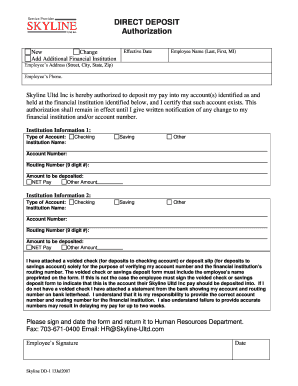
Get Skyline Direct Deposit Form
How it works
-

Open form follow the instructions
-

Easily sign the form with your finger
-

Send filled & signed form or save
How to fill out the Skyline Direct Deposit Form online
The Skyline Direct Deposit Form is a crucial document that allows users to authorize the deposit of their paychecks directly into their bank accounts. This guide provides a clear, step-by-step approach to filling out the form online, ensuring that you provide all necessary information accurately.
Follow the steps to complete the Skyline Direct Deposit Form online
- Click ‘Get Form’ button to begin the process of obtaining the Skyline Direct Deposit Form and open it in your preferred form editor.
- Indicate whether this is a new authorization, a change, or an addition of an additional financial institution by selecting the appropriate option.
- Fill in your effective date, which indicates when you wish the deposit to start.
- Enter your employee name in the format of Last, First, MI, followed by your address, including street, city, state, and zip code.
- Provide your phone number to ensure contact availability.
- In the Institution Information section 1, specify the type of account (checking, savings, or other) and the name of the financial institution.
- Enter your account number and the routing number, which is a 9-digit number, ensuring accuracy to prevent delays in paycheck deposits.
- Specify the amount to be deposited – either the net pay or another specified amount.
- Repeat steps 6 to 8 for Institution Information section 2 if you are setting up multiple accounts.
- Attach a voided check or a deposit slip for the savings account to verify the account number and routing number, ensuring your name is preprinted or signed to confirm your ownership.
- Review all provided information for accuracy, as errors may result in delayed payments.
- Sign and date the form at the designated area to validate your authorization.
- Once completed, return the form to the Human Resources Department via fax or email.
Begin completing your Skyline Direct Deposit Form online today!
The employer provides the form to the employee to fill out usually upon hire (since the option for direct deposit is an expectation of employees these days). The form is where the employee gives you permission for direct deposit and provides the bank information that you'll need to send them money.