Loading
Get Disability - Payment Safeguard Home
How it works
-

Open form follow the instructions
-

Easily sign the form with your finger
-

Send filled & signed form or save
How to use or fill out the Disability - Payment Safeguard Home online
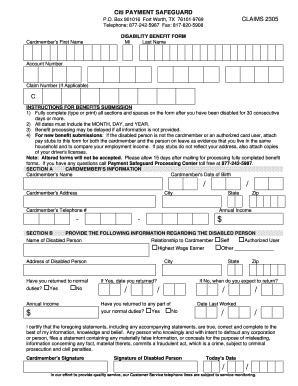
This guide provides a detailed overview of the Disability - Payment Safeguard Home form, which is essential for submitting a claim for disability benefits. By following these instructions, you will be able to complete the form accurately and efficiently.
Follow the steps to successfully complete your Disability - Payment Safeguard Home form.
- Click ‘Get Form’ button to obtain the form and open it for completion.
- Fill out the cardmember’s information in Section A including their first name, middle initial, last name, account number, and claim number if applicable. Ensure all dates are formatted as month, day, and year.
- Provide complete details about the disabled person in Section B. This includes their name, relationship to the cardmember, address, and whether they have returned to normal duties.
- If the disabled individual has returned to duties, indicate the date they returned. If not, provide an expected return date. Include their annual income as well.
- In Section C, ensure that the attending physician’s statement is filled out. This includes nature of the illness or injury, important dates, and whether the patient is still under care. Provide the physician's contact information and signature.
- After completing the form, review all sections to ensure accuracy and completeness. Save the changes and download the form if you need a copy.
- Finally, print the completed form for your records, or share it as required. Allow 15 days after mailing for processing fully completed benefit forms.
Complete your Disability - Payment Safeguard Home form online today for a seamless benefits submission experience.
Conditional elements are supported in HTML Forms by using two special attributes: data-show-if and data-hide-if . Using these attributes allows you to hide or show parts of your form by referencing the name attribute of a field in your form.