Loading
Get Natwest Application Form
How it works
-

Open form follow the instructions
-

Easily sign the form with your finger
-

Send filled & signed form or save
How to fill out the Natwest Application Form online
This guide provides a clear and professional overview of how to complete the Natwest Application Form online. By following the steps outlined below, users can efficiently fill out the necessary fields and submit their application with confidence.
Follow the steps to successfully complete the Natwest Application Form online.
- Press the ‘Get Form’ button to access the Natwest Application Form and launch it for editing.
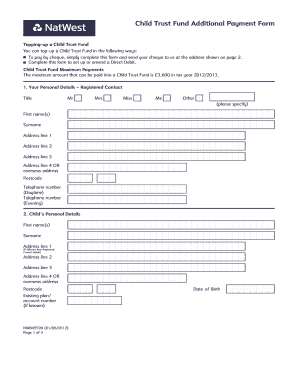
- Provide your personal details in Section 1, including your title, first name, surname, address, and telephone numbers. Ensure that all information is accurate and up-to-date.
- In Section 2, input the child's personal details, including their first name, surname, address (if different), postcode, existing plan or account number, and date of birth in the specified format.
- Move on to Section 3 to indicate your payment preferences. Specify whether you wish to make a single payment or increase your monthly payments. Clearly state the payment amounts included.
- Sign the form in Section 4, confirming you have read the relevant documents and will retain them for your records.
- Finally, review the completed form for accuracy. Save your changes before you download, print, or share the form as needed.
Complete your Natwest Application Form online today to facilitate your Child Trust Fund transaction.
Your step-by-step guide: Open the NatWest app and tap 'I'm already a customer' to get started. ... Enter your Online Banking customer number. ... Enter in the requested characters from your Online Banking PIN and Password. ... Confirm the mobile number we hold on file for you is correct and enter the activation code we text to you.