Loading
Get K32 Full Fill
How it works
-

Open form follow the instructions
-

Easily sign the form with your finger
-

Send filled & signed form or save
How to fill out the K32 Full Fill online
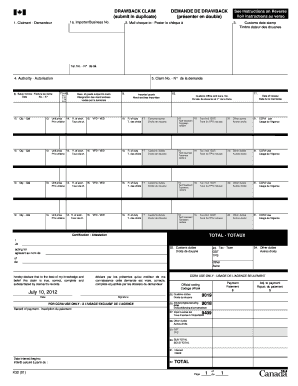
Filling out the K32 Full Fill form online can be straightforward with the right guidance. This document is essential for submitting a drawback claim to the Canada Border Services Agency, and understanding each component will help users complete it accurately.
Follow the steps to fill out the K32 Full Fill online successfully.
- Press the ‘Get Form’ button to access the K32 Full Fill form and open it in your preferred digital editor.
- In section 1a, enter the importer or business number that corresponds to your claim. This information links your company to the claim being filed.
- In section 1, identify yourself as the claimant by providing your name and contact information.
- Section 2 requires you to specify where you would like the cheque for your claim to be mailed. Be sure to provide a complete address for accurate delivery.
- Obtain a customs date stamp on your form, which serves as proof of submission.
- In section 4, provide the applicable authority information as required.
- Section 5 asks for the claim number. If you do not have a claim number, indicate that it is your first claim.
- In section 6, enter the sales invoice date and number, which will support the transactions linked to your claim.
- Section 7 requires you to describe the goods subject to claim. Be detailed to avoid any issues with your application.
- List the imported goods in section 9, providing necessary details to support your drawback claim.
- Specify the customs office and transaction number in section 10.
- Enter the date of release for the goods in section 11.
- In section 12, indicate the quantity of the goods.
- In section 13, fill in the unit price of each good.
- Section 14 requires the exchange rate used for the transaction, which is crucial for accurate calculations of duties.
- Detail the rate of duty in section 16, which will help in determining the amount of drawback due.
- Section 18 needs the tariff treatment and any relevant codes that apply.
- Indicate the total amount of customs duties in section 25.
- Complete section 30 with the subtotal of your claim.
- Certify the accuracy of your claim in section 22, providing your signature and date to affirm the truth of the information presented.
Complete your K32 Full Fill form online for a streamlined drawback claim process.
K32A – Certificate of Importation, Sale, or Transfer.