Loading
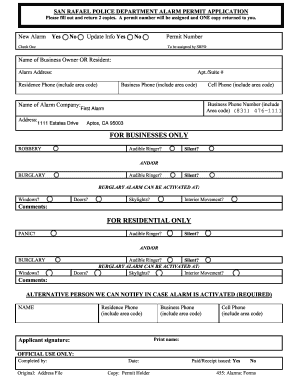
Get City Of San Rafael Alarm Permit Application - First Alarm
How it works
-

Open form follow the instructions
-

Easily sign the form with your finger
-

Send filled & signed form or save
How to fill out the City Of San Rafael Alarm Permit Application - First Alarm online
This guide provides clear, step-by-step instructions for completing the City Of San Rafael Alarm Permit Application - First Alarm online. By following these detailed directions, users can ensure their application is filled out accurately and efficiently.
Follow the steps to complete your application effectively.
- Click ‘Get Form’ button to obtain the application form and open it for editing.
- Begin filling out the section labeled 'New Alarm' or 'Update Info' by selecting the appropriate option.
- Enter the name of the business owner or resident in the provided field.
- Input the alarm address, including any apartment or suite number for accurate identification.
- Fill in the residence phone number, ensuring to include the area code.
- Provide the business phone number, again including the area code.
- Enter the name of the alarm company as 'First Alarm'.
- Complete the alarm company's address field with '1111 Estates Drive, Aptos, CA 95003'.
- Include a cell phone number with area code as a contact for emergency notifications.
- For business applications, detail the capabilities of the alarm including whether it has audible ringers and/or silent alerts in response to robbery and burglary.
- Indicate the specific activation points for the burglary alarm, such as windows, doors, skylights, or interior movement.
- For residential applications, specify whether a panic alarm is available, and whether it is audible or silent.
- Ensure to fill out activation points for residential burglary alarms, similar to the business section.
- Provide details for an alternative person who can be notified in case the alarm is activated by filling in their name, residence phone, business phone, and cell phone.
- Print your name and add your signature at the bottom of the application.
- Once all required fields are completed, save your changes, and you may proceed to download, print, or share the completed form.
Complete your City Of San Rafael Alarm Permit Application online today to expedite your permit processing.
Please call 602-534-6613 or TTY City Relay at 602-534-5500.
Industry-leading security and compliance
US Legal Forms protects your data by complying with industry-specific security standards.
-
In businnes since 199725+ years providing professional legal documents.
-
Accredited businessGuarantees that a business meets BBB accreditation standards in the US and Canada.
-
Secured by BraintreeValidated Level 1 PCI DSS compliant payment gateway that accepts most major credit and debit card brands from across the globe.