Loading
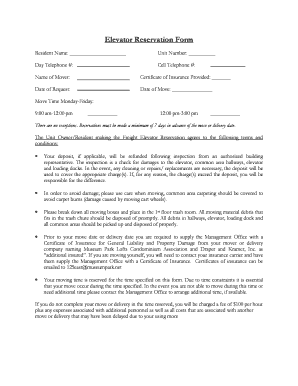
Get Elevator Reservation Form - Chicago Condo Association ...
How it works
-

Open form follow the instructions
-

Easily sign the form with your finger
-

Send filled & signed form or save
How to fill out the Elevator Reservation Form - Chicago Condo Association online
This guide provides clear and comprehensive instructions on how to successfully complete the Elevator Reservation Form for the Chicago Condo Association. It is designed to assist all users, regardless of their level of experience with online document management.
Follow the steps to fill out the Elevator Reservation Form online.
- Press the ‘Get Form’ button to obtain the form and open it in your preferred document editor.
- Enter your full name in the 'Resident Name' field. This should be the individual who resides in the condo.
- Fill in your unit number in the designated field, ensuring accuracy for proper identification.
- Provide your daytime telephone number for any necessary communication regarding the reservation.
- Enter your cell telephone number for additional contact options.
- Input the name of the mover who will be assisting with your move. If you are moving yourself, you can enter your own name.
- Indicate whether a Certificate of Insurance has been provided by the mover or if it is needed for your personal insurance.
- Select the request date by entering the date you are submitting this form.
- Specify the move date in the appropriate field. This is the date you plan to move.
- Choose the move time by checking either the '9:00 am-12:00 pm' or '12:00 pm-3:00 pm' option, adhering to the time slots mentioned.
- Ensure you are aware and acknowledge that reservations should be made at least seven days in advance of the move or delivery date.
- Review the terms and conditions provided in the form. Acknowledge understanding of fees, responsibilities, and insurance requirements as you fill out this form.
- Complete any payment sections, including the deposit and move fee amounts. Attach the necessary checks if applicable.
- Finally, sign and date the form in the spaces provided, indicating you have completed the form and have contacted the office to schedule your elevator reservation.
Complete your Elevator Reservation Form online to ensure a smooth moving experience.
Industry-leading security and compliance
US Legal Forms protects your data by complying with industry-specific security standards.
-
In businnes since 199725+ years providing professional legal documents.
-
Accredited businessGuarantees that a business meets BBB accreditation standards in the US and Canada.
-
Secured by BraintreeValidated Level 1 PCI DSS compliant payment gateway that accepts most major credit and debit card brands from across the globe.