Loading
Get Boundary Line Verification Form 090208 - Nevada County ...
How it works
-

Open form follow the instructions
-

Easily sign the form with your finger
-

Send filled & signed form or save
How to fill out the Boundary Line Verification Form 090208 - Nevada County online
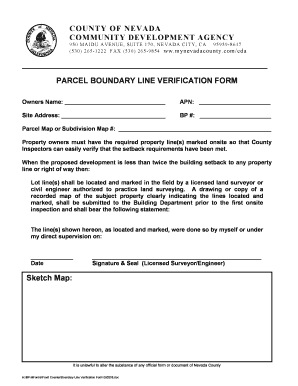
The Boundary Line Verification Form 090208 is essential for property owners in Nevada County who need to verify property lines prior to development. This guide provides step-by-step instructions on how to fill out the form online, ensuring clarity and ease of use for all users.
Follow the steps to complete the Boundary Line Verification Form online.
- Click the ‘Get Form’ button to retrieve the Boundary Line Verification Form and open it for editing.
- In the first section, enter the owner's name in the designated field. This identifies the individual or entity making the request.
- Fill in the Assessor's Parcel Number (APN) in the corresponding field. This number is crucial for property identification and verification.
- Provide the site address for the property in the specified section to ensure clarity about the location in question.
- If applicable, enter the Building Permit (BP) number for this project, providing necessary reference information.
- Include the Parcel Map or Subdivision Map number in the appropriate field. This helps link the form to the official mapping records of the property.
- Ensure that all property lines are clearly marked onsite by a licensed land surveyor or a civil engineer authorized to practice land surveying.
- Attach a drawing or copy of a recorded map of the subject property clearly indicating the marked lines.
- Have the licensed surveyor or engineer provide their signature, seal, and date of marking on the form as specified.
- After completing all sections, review the form for accuracy and completeness. Save your changes, and download or print the completed form for submission.
Complete your Boundary Line Verification Form online today to streamline your property development process.
Related links form
Option 1: In your settings app Open your phone's Settings app. Tap Notifications. App settings. Under 'Most recent', find apps that recently sent you notifications. To find more apps, in the drop-down menu, tap All apps. Tap the app. Turn the app's notifications on or off.
Industry-leading security and compliance
US Legal Forms protects your data by complying with industry-specific security standards.
-
In businnes since 199725+ years providing professional legal documents.
-
Accredited businessGuarantees that a business meets BBB accreditation standards in the US and Canada.
-
Secured by BraintreeValidated Level 1 PCI DSS compliant payment gateway that accepts most major credit and debit card brands from across the globe.