Loading
Get Hmsa Travel Reimbursement
How it works
-

Open form follow the instructions
-

Easily sign the form with your finger
-

Send filled & signed form or save
How to fill out the Hmsa Travel Reimbursement online
This guide provides detailed instructions on how to complete the Hmsa Travel Reimbursement form online. By following these steps, you will ensure that your travel expenses are submitted accurately and efficiently.
Follow the steps to complete your Hmsa Travel Reimbursement online.
- Press the ‘Get Form’ button to access the form and open it in your preferred document editor.
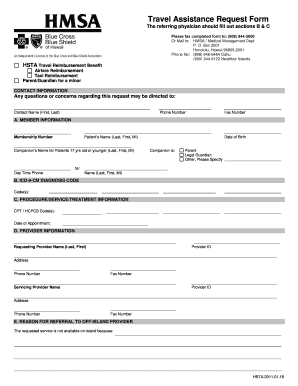
- Fill out section A: Member Information. Enter your membership number, patient’s name (last, first, middle initial), companion’s name (if applicable), date of birth, and specify the relationship of the companion.
- Proceed to section B: ICD-9-CM Diagnosis Code. Enter the appropriate diagnosis code(s) relevant to the patient's condition.
- Complete section C: Procedure/Service/Treatment Information. Provide the CPT/HCPCS code(s), along with the date of the appointment.
- Move to section D: Provider Information. Enter the requesting provider's name, provider ID, address, phone number, and fax number. Also, fill out the servicing provider’s details.
- In section E: Reason for Referral to Off-Island Provider, state the reason the requested service is not available on-island.
- Review all provided information for accuracy, and ensure completeness of the form.
- Once satisfied with the information entered, you can save changes, download, print, or share the form as needed.
Complete your Hmsa Travel Reimbursement form online today and submit promptly for reimbursement.
Customer Service: Calls to these numbers are free: Current members may call 1 (800) 776-4672. Prospective members may call 1 (800) 618-4672.