Loading
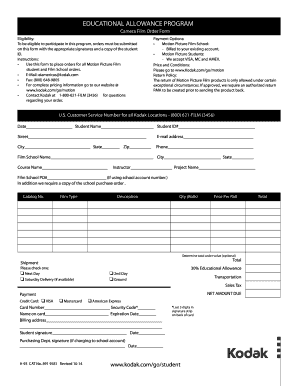
Get Kodak Educational Allowance Program
How it works
-

Open form follow the instructions
-

Easily sign the form with your finger
-

Send filled & signed form or save
How to fill out the Kodak Educational Allowance Program online
The Kodak Educational Allowance Program offers financial support for students enrolling in motion picture film courses. This guide provides a clear, step-by-step approach to completing the program application online.
Follow the steps to fill out your application accurately.
- Click ‘Get Form’ button to acquire the form and open it in your editing tool.
- Begin by entering the date at the top of the form to indicate when the application is being submitted.
- Fill in your full name as the student, ensuring that it matches your identification documents.
- Provide your student ID number, as this is crucial for verification of your eligibility.
- Input your street address, ensuring accuracy to guarantee the shipment of materials.
- Include your e-mail address, which may be used for communications regarding your order.
- Enter your city, state, and zip code to complete your address information.
- Enter your phone number to provide a contact method for any follow-up regarding your order.
- Specify the name of your film school and its location to confirm your enrollment.
- Indicate the course name you are taking, along with your instructor's name and the project name to clarify your request.
- If applicable, include the film school purchase order number to facilitate billing.
- Detail the catalog number, film type, description, quantity of rolls, and price per roll for your order, ensuring all information is accurate.
- Determine the total order value, though this step is optional.
- Select your preferred shipping method, such as next day, 2nd day, or Saturday delivery if available.
- Choose the transportation option, verifying whether you prefer ground transport.
- Calculate the sales tax and total amount due based on your selections.
- Complete the payment information by selecting your credit card type, entering the card number, security code, name on the card, and expiration date.
- Fill in the billing address to ensure proper processing of the card.
- Sign the form in the student signature area and date it to confirm your application.
- If the charge is to be made on a school account, ensure the purchasing department signature is provided along with the date.
- Once all fields are completed, save your changes, download, print, or share your filled form as needed.
Complete your Kodak Educational Allowance Program application online today!