Loading
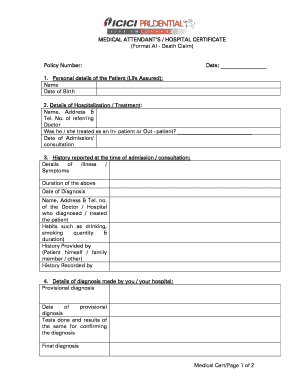
Get Last Medical Attendant?s Certificate. Change Request Form
How it works
-

Open form follow the instructions
-

Easily sign the form with your finger
-

Send filled & signed form or save
How to fill out the LAST MEDICAL ATTENDANT’S CERTIFICATE Change Request Form online
Filling out the LAST MEDICAL ATTENDANT’S CERTIFICATE Change Request Form online is an essential process for ensuring that all relevant medical information is accurately captured and submitted. This guide provides clear, step-by-step instructions for completing this form effectively.
Follow the steps to complete the change request form online.
- Press the ‘Get Form’ button to access the form and open it in your online editor.
- Begin by entering the policy number at the top of the form. This information is crucial for identifying the specific claim associated with the patient's medical details.
- In the first section, provide the personal details of the patient (life assured). Include the patient's name and date of birth in the specified fields.
- Next, fill in the hospitalization or treatment details. Record the name, address, and telephone number of the referring doctor. Also, indicate whether the patient was treated as an inpatient or outpatient, and provide the date of admission or consultation.
- In the history reported section, include details of the illness or symptoms the patient experienced. Note the duration of these symptoms, the date of diagnosis, and the medical professional or hospital that diagnosed or treated the patient.
- Provide information on the diagnosis made by the medical attendant or hospital. Include the provisional diagnosis, the date it was made, any tests done along with their results, the final diagnosis, and the date of the final diagnosis. Mention the treatment given and its duration, as well as the date of discharge or death.
- If applicable, detail the circumstances surrounding the patient's death, including primary and secondary causes, whether these were ascertained by examination or symptoms, and the complaints or symptoms experienced just before death.
- If the patient had been admitted or treated prior, provide details including the dates, whether it was inpatient or outpatient, the reason for treatment, and the duration of treatment.
- Finally, sign and date the form at the specified location, include the name of the medical attendant or authorized signatory, the name and address of the hospital, and the hospital's telephone number. Attach any required records as specified.
- Once all sections are completed, save your changes. You may download, print, or share the form as needed.
Complete your documents online to ensure accurate and timely processing.
CNA stands for “certified nursing assistant,” an entry-level role that provides vital support to both patients and nurses. From transporting, bathing, and feeding hospital patients, to stocking medical supplies and logging patient information, CNAs are on the ground working to enhance patient outcomes.