Loading
Get Ct Marriage License
How it works
-

Open form follow the instructions
-

Easily sign the form with your finger
-

Send filled & signed form or save
How to fill out the Ct Marriage License online
Filling out the Ct Marriage License online can streamline the process of obtaining a marriage certificate. This guide offers clear instructions for each section of the application to ensure that users complete the form accurately and efficiently.
Follow the steps to complete the Ct Marriage License application
- Click ‘Get Form’ button to obtain the application and open it in your preferred editor.
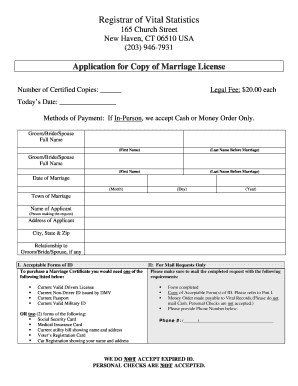
- Begin by entering the number of certified copies you wish to request in the appropriate space. Each copy has a legal fee of $20.00.
- Enter today’s date in the designated field, ensuring it is formatted correctly.
- In the section for the groom/bride/spouse, provide the full name, including first name and last name before marriage. Repeat this for the second groom/bride/spouse if applicable.
- Input the date of marriage in the specified format, including month, day, and year.
- Specify the town where the marriage took place.
- Provide the name of the applicant — the person making the request — followed by their address, city, state, and zip code.
- Indicate your relationship to the groom/bride/spouse, if applicable.
- Refer to the acceptable forms of ID section and ensure you have the required identification based on how you will submit your application.
- If submitting by mail, gather and include the required supporting documents as listed in the instructions.
- Include your phone number in the designated area.
- Once all fields are filled out, review the application for completeness and accuracy before saving changes, downloading, printing, or sharing the form.
Begin completing your Ct Marriage License application online today to ensure a smooth process.
There is no waiting period in CT. If you have your marriage license you can be married the same day.