Loading
Get Motor Repair Request Form
How it works
-

Open form follow the instructions
-

Easily sign the form with your finger
-

Send filled & signed form or save
How to fill out the Motor Repair Request Form online
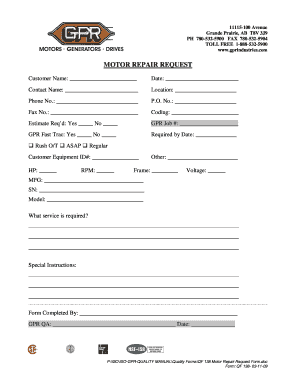
Filling out the Motor Repair Request Form online is a straightforward process that allows users to request essential motor repair services efficiently. This guide will provide you with step-by-step instructions on how to complete the form, ensuring all necessary details are accurately provided.
Follow the steps to complete the Motor Repair Request Form accurately.
- Click ‘Get Form’ button to retrieve the Motor Repair Request Form and open it in your preferred editing tool.
- Enter the customer name in the designated field at the top of the form. Ensure that the name accurately represents the company or individual making the request.
- Fill in the date you are completing the request form. This is critical for processing and tracking the request effectively.
- Provide the contact name, which typically refers to the person managing the repair request or communication.
- Indicate the location where the repair service should take place. This may include a physical address or a site reference.
- Enter a phone number where you can be reached for any follow-up regarding the request.
- Fill in the purchase order number (P.O. No.) if applicable. This can assist in aligning the repair request with any existing documentation.
- Provide your fax number if you wish to receive updates or confirmations via fax.
- Complete the coding section, which may be for internal tracking or categorization purposes.
- Indicate if an estimate is required by selecting 'Yes' or 'No.' This clarifies your expectation of preliminary pricing before the service.
- If applicable, enter the GPR job number relevant to this request.
- Specify if you would like to use the GPR Fast Trac service by selecting 'Yes' or 'No.'
- Provide the required by date to indicate when the service is needed. This helps prioritize your request.
- Indicate the urgency of the request by selecting from options such as 'Rush O/T,' 'ASAP,' or 'Regular.'
- Fill in the customer equipment ID number to help identify the specific equipment needing repair.
- Provide details related to horsepower (HP) and RPM as necessary for the repair specifications.
- Fill in any other relevant specifications that pertain to the service or equipment.
- Complete sections on frame specifications, voltage, manufacturer (MFG), serial number (SN), and model of the equipment.
- Describe the service required in detail in the provided section. Being comprehensive here will help the service provider understand your needs.
- Include any special instructions you may have that are pertinent to the repair request.
- Lastly, enter your name in the 'Form Completed By' field, signifying who filled out the request form.
- Ensure that everything is accurately filled out, then save changes. You can then download, print, or share the form as needed.
Complete your documents online today to ensure a smooth repair request process.
Repair order (RO) a legal document written for every vehicle brought into the shop for service. Contains all vehicle and customer information and the list of service work that is to be completed. Also called a work order.
Industry-leading security and compliance
US Legal Forms protects your data by complying with industry-specific security standards.
-
In businnes since 199725+ years providing professional legal documents.
-
Accredited businessGuarantees that a business meets BBB accreditation standards in the US and Canada.
-
Secured by BraintreeValidated Level 1 PCI DSS compliant payment gateway that accepts most major credit and debit card brands from across the globe.