Loading
Get Plea / Disposition Form - E-gov Link
How it works
-

Open form follow the instructions
-

Easily sign the form with your finger
-

Send filled & signed form or save
How to fill out the PLEA / DISPOSITION FORM - E-Gov Link online
Filling out the PLEA / DISPOSITION FORM online can simplify your interaction with the court system. This guide will provide detailed steps to ensure you complete the form accurately and efficiently.
Follow the steps to successfully complete the PLEA / DISPOSITION FORM online.
- Press the ‘Get Form’ button to access the form and open it in your preferred editor.
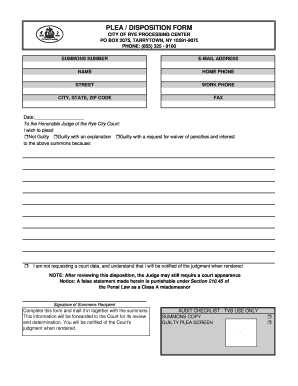
- Enter your summons number at the top of the form. This number is essential for the court to identify your case.
- Provide your email address to receive notifications regarding your case.
- Fill in your name as the recipient of the summons.
- Input your home phone and work phone numbers to ensure the court can reach you if necessary.
- Complete your street address, along with the city, state, and ZIP code.
- If applicable, provide your fax number.
- Date the form accurately. This indicates when you completed the document.
- Choose your plea option by marking the corresponding box: Not Guilty, Guilty with an explanation, or Guilty with a request for waiver of penalties and interest.
- If you are not requesting a court date, indicate this by checking the appropriate box and understanding that you will be notified of the judgment once it is rendered.
- Sign the form as the recipient of the summons to validate your submission.
- Complete the form and send it back to the court, along with the original summons you received.
- After submitting, keep track of any notifications from the court regarding the judgment on your case.
Complete your PLEA / DISPOSITION FORM online today to ensure a swift resolution to your case.
To file this lawsuit, you must go to the General District Court Clerk's office. Ask for the proper court form. To sue for money, fill out a "Warrant in Debt." Even though this court form is called a "warrant," it is not used in a criminal case. It is used in a civil (non-criminal) case.