Loading
Get Lab 11.2.3d Multiple Access Lists Functions (challenge Lab) - Cisco
How it works
-

Open form follow the instructions
-

Easily sign the form with your finger
-

Send filled & signed form or save
How to fill out the Lab 11.2.3d Multiple Access Lists Functions (Challenge Lab) - Cisco online
This guide aims to provide users with clear and detailed instructions on how to complete the Lab 11.2.3d Multiple Access Lists Functions (Challenge Lab) from Cisco. Users will learn how to approach each section and field of the document to ensure accurate and efficient completion.
Follow the steps to effectively complete the lab document online.
- Click the ‘Get Form’ button to access the document and open it in your browser or edit interface.
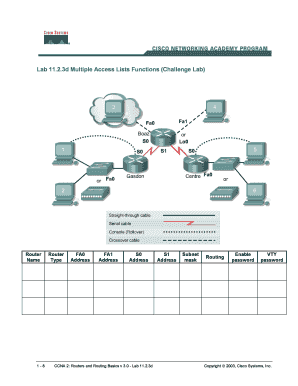
- Begin by entering the router name in the designated field at the top of the form. Ensure that the name aligns with the router’s identification.
- In the Router Type field, select the appropriate interface type by clicking on the drop-down menu and choosing the correct option (e.g., FA0, FA1, S0, S1).
- Fill in the IP address for each router interface, ensuring to follow the structure specified in the lab guidelines.
- Next, input the subnet mask information. Be precise and ensure that the mask matches the designated class C private address.
- Proceed to set the routing protocol. Enter the appropriate command for RIP or IGRP based on your lab requirements.
- For security purposes, establish the enable and VTY passwords. Make sure these passwords are secure and meet the lab specifications.
- Utilize the scenario section to capture the specifics of the network setup required for the challenge.
- After completing all fields, review the entries for accuracy. Save your work, and consider downloading a copy of the document.
- Finally, you may print or share the lab document as necessary, making sure to keep a record for future reference.
Complete your Lab 11.2.3d challenge online today!
What Three Routers Do I Need In My CCNA Lab? One router with dual Ethernet interfaces to do your NAT/PAT labs. We suggest the 1841, 2811, or 1941 as these routers can do this and also get you exposure to IOS 15, inter-VLAN routing, etc. ... One router with two serial ports to establish links to the other two routers.
Industry-leading security and compliance
US Legal Forms protects your data by complying with industry-specific security standards.
-
In businnes since 199725+ years providing professional legal documents.
-
Accredited businessGuarantees that a business meets BBB accreditation standards in the US and Canada.
-
Secured by BraintreeValidated Level 1 PCI DSS compliant payment gateway that accepts most major credit and debit card brands from across the globe.