Loading
Get Medicare Admissions Form
How it works
-

Open form follow the instructions
-

Easily sign the form with your finger
-

Send filled & signed form or save
How to fill out the Medicare Admissions Form online
Filling out the Medicare Admissions Form online can seem challenging, but with clear guidance, it becomes a manageable task. This guide will walk you through each step of the process to ensure that your form is completed accurately and efficiently.
Follow the steps to complete the Medicare Admissions Form with ease.
- Press the ‘Get Form’ button to obtain the form, which will open in your preferred editor.
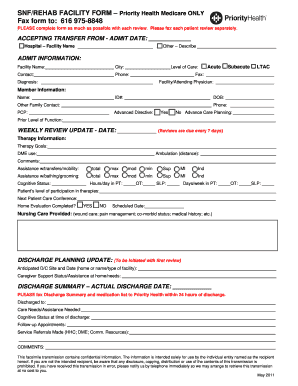
- Begin with the ‘Accepting transfer from’ section. Indicate the admit date and select the facility type by checking either 'Hospital' or 'Other.' Provide the facility name where applicable.
- In the ‘Admit Information’ section, fill in the name of the facility, the city, and the contact person's details. Make sure to specify the level of care required by checking the appropriate box: Acute, Subacute, or LTAC.
- Continue by providing member information including their name, ID number, date of birth, and contact phone number.
- Fill in the ‘Other Family Contact’ section with the name of the primary care provider and note whether there is an advanced directive by checking 'Yes' or 'No.'
- Document the prior level of function and complete the ‘Weekly Review Update’ section with the review date, ensuring timely follow-ups every seven days.
- In the ‘Therapy Information’ section, outline therapy goals and document any durable medical equipment needs. Additionally, indicate ambulation distance and assistance levels for transfers and mobility.
- Describe the cognitive status, daily and weekly participation in physical, occupational, and speech therapy, and include details on the next patient care conference.
- For discharge planning updates, provide anticipated discharge site and date, as well as caregiver support status.
- Finally, complete the discharge summary section with the actual discharge date, care needs, cognitive status at discharge, follow-up appointments, and any service referrals made.
- Once finished, review all entries for accuracy. Save changes, download a copy, print the form, or share it as needed.
Complete your Medicare Admissions Form online today for a smoother admissions process.
CMS-855I: For employed physician assistants (sections 1, 2, 3, 13, and 15). CMS-855R: Individuals reassigning (entire application). CMS-855O: All eligible physicians and non-physician practitioners (entire application).