Loading
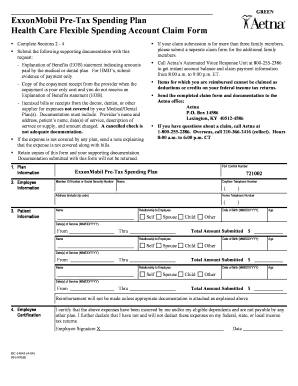
Get Exxonmobil Aetna Flexible Spend Form
How it works
-

Open form follow the instructions
-

Easily sign the form with your finger
-

Send filled & signed form or save
How to fill out the ExxonMobil Aetna Flexible Spend Form online
Completing the ExxonMobil Aetna Flexible Spend Form online is essential for managing your health care expenses effectively. This guide provides easy-to-follow instructions designed to help users fill out the form accurately and submit it without complications.
Follow the steps to complete your form efficiently.
- Click ‘Get Form’ button to obtain the form and open it in the online editor.
- In Section 1, enter the plan information. You will need to provide your FSA Control Number and Member ID Number or Social Security Number.
- Move to Section 2 to fill out employee information, including your name, daytime telephone number, and address. Make sure to include your zip code.
- Proceed to Section 3, where you will input patient information for each individual receiving care. This includes their name, relationship to you, date of birth, age, and the dates of service.
- For any additional family members or expenses, repeat the previous step with their respective details in the section provided.
- Once you have filled in all the necessary fields, review the information to ensure accuracy. Total the amount submitted and include this in the designated field.
- In Section 4, sign and date the employee certification, confirming that the expenses have been incurred and are not covered by any other plan.
- Save your completed form and the necessary supporting documentation as outlined in the instructions. Make sure to keep copies for your records.
- Finally, you can download, print, or share the completed form as needed for submission to Aetna at the provided address.
Complete your ExxonMobil Aetna Flexible Spend Form online for a hassle-free experience.
Log in to the FSAFEDS app using the same username and password as your online account. Select whether to submit a claim or pay a provider. Follow the prompts to enter claims details. Take photos of your itemized receipts (and other documentation if needed) or upload from your mobile device.