Loading
Get Brazoria County Mud 29
How it works
-

Open form follow the instructions
-

Easily sign the form with your finger
-

Send filled & signed form or save
How to fill out the Brazoria County Mud 29 online
This guide provides a detailed overview of how to accurately complete the Brazoria County Mud 29 document online. By following these instructions, you will efficiently navigate each section required for the termination of water service.
Follow the steps to complete the form correctly.
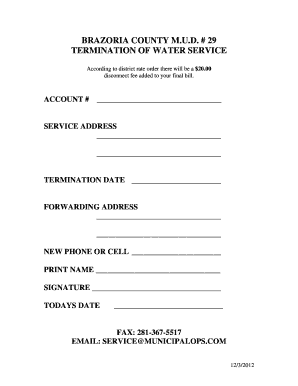
- Click ‘Get Form’ button to obtain the document and open it in the editor.
- Enter your account number in the designated field to identify your services.
- Fill in the service address where the water service is currently active. This should include all relevant details such as street number, street name, city, and zip code.
- Specify the termination date for the water service by entering the desired date in the provided space.
- Provide your forwarding address where you would like to receive any final correspondence or bills related to your account.
- If applicable, fill in your new phone or cell number to ensure that you can be contacted if needed.
- Print your name clearly in the section provided to indicate the individual terminating the service.
- Sign the form where indicated to formally authorize the termination of service.
- Enter today’s date in the specified area to document when the request is made.
- Review all entered information for accuracy before proceeding to save, download, print, or share the completed form.
Complete your Brazoria County Mud 29 document online today.
Payments may be made via: Pay online – at mdswater.com: ... Pay by phone – at 833-560-2597. Pay at In-District locations – Kroger, HEB grocery stores and Wal-Marts. Pay via your bank – generate the payment with your bank's bill pay service. Pay via mail – US Postal Service (P.O. Box 3150, Houston, TX 77253-3150)