Loading
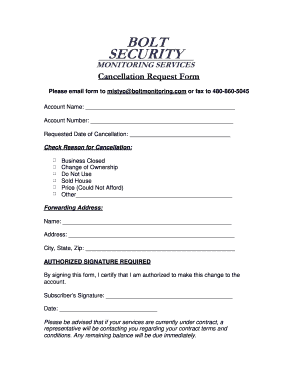
Get Cancellation Request Form - Bolt Security Monitoring Services
How it works
-

Open form follow the instructions
-

Easily sign the form with your finger
-

Send filled & signed form or save
How to fill out the Cancellation Request Form - Bolt Security Monitoring Services online
This guide provides comprehensive instructions on completing the Cancellation Request Form for Bolt Security Monitoring Services. Follow the steps below to ensure your cancellation request is submitted accurately and efficiently.
Follow the steps to fill out the cancellation request form seamlessly.
- Click ‘Get Form’ button to obtain the Cancellation Request Form and open it in the appropriate editor.
- Enter your account name in the designated field. Ensure that the name matches the account under which the services are provided.
- Provide your account number in the corresponding field. This helps identify your account for the cancellation process.
- Input the requested date of cancellation. Be specific about when you would like the cancellation to take effect.
- Select the reason for cancellation by checking the appropriate box. Options include 'Business Closed', 'Change of Ownership', 'Do Not Use', 'Sold House', 'Price (Could Not Afford)', or 'Other' with an option to specify.
- Fill out your forwarding address details in the required fields, including your name, street address, city, state, and zip code. This is necessary for any future correspondence.
- Sign the form in the indicated area to certify that you are authorized to make this cancellation. Include the date of your signature to record when the cancellation was requested.
- Review the form for accuracy before submission. Check that all fields are completed and there are no errors.
- Once completed, you can save the changes, download a copy, print the form, or share it as necessary. Ensure you email the form to mistyo@boltmonitoring.com or fax it to 480-860-5045.
Complete your Cancellation Request Form online today to ensure a smooth cancellation process.