Loading
Form preview
  • US Legal Forms
  • Form Library
  • More Forms
  • More Uncategorized Forms
  • Century Link Beneficiary Form

Get Century Link Beneficiary Form

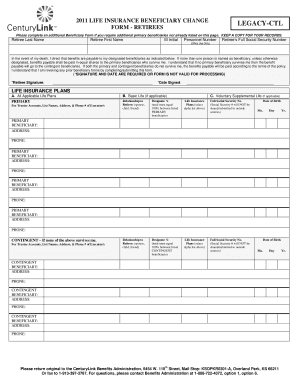
EP A COPY FOR YOUR RECORDS. Retiree Last Name Retiree First Name M Initial Personnel Number Retiree s Full Social Security Number (Office Use Only) In the event of my death, I direct that benefits are payable to my designated beneficiaries as indicated below. If more than one person is named as beneficiary, unless otherwise designated, benefits payable shall be paid in equal shares to the primary beneficiaries who survive me. I understand that if no primary beneficiary survives me then.

How it works

  1. Open form

    Open form follow the instructions

  2. Easily sign form

    Easily sign the form with your finger

  3. Share form

    Send filled & signed form or save

How to fill out the Century Link Beneficiary Form online

This guide provides clear and supportive instructions on how to complete the Century Link Beneficiary Form online. Users can confidently follow the steps outlined to ensure their beneficiary designations are accurately recorded.

Follow the steps to fill out the Century Link Beneficiary Form online.

  1. Click ‘Get Form’ button to obtain the document and open it in your preferred editing tool.
  2. Begin by entering the retiree's last name, first name, and middle initial in the designated fields.
  3. Provide the personnel number and the retiree's full Social Security number in the respective sections.
  4. Indicate the primary beneficiaries by filling in their full name, relationship to the retiree, and designated percentage of the benefit. Ensure the total percentage equals 100% for all primary beneficiaries listed.
  5. For each primary beneficiary, include their full Social Security number, ensuring that this information remains confidential.
  6. Repeat the process for contingent beneficiaries, filling out their full name, relationship, and designated percentage while also ensuring percentages sum to 100%.
  7. If applicable, include information for voluntary supplemental life coverage by entering the primary beneficiary details and their date of birth.
  8. Do not forget to sign and date the form where indicated; without these, the form is not valid for processing.
  9. Review all entered information for accuracy, save your changes, and prepare to print or share the form as needed.
  10. Submit the completed form to CenturyLink Benefits Administration using the provided mailing address or fax number.

Complete your Century Link Beneficiary Form online today to ensure your benefits are managed according to your wishes.

Get form

Experience a faster way to fill out and sign forms on the web. Access the most extensive library of templates available.
Get form

Related content

EX-10.5 2 a2207599zex-10_5.htm EX-10.5 Exhibit...
1.01 This CenturyLink, Inc. Supplemental Defined Benefit Plan was ... the amount payable...
Learn more
Beneficiary Designation/Change Standard Insurance...
This designation will apply to the following Standard Insurance Company coverage(s) if...
Learn more
2017 General Instructions for Forms W-2 and W-3...
May 2, 2017 — information, see the 21st Century Cures Act, Public Law. 114–255...
Learn more

Related links form

OHSU LIBRARY THESIS BINDING SUBMISSION FORM & RECEIPT ... - Ohsu Media Release Form Mississauga Sign Permit Bylaw 00542002 Form FINAL SUBDIVISION APPLICATION - City Of Spokane Valley

Questions & Answers

Get answers to your most pressing questions about US Legal Forms API.

Contact support

Life insurance beneficiaries can be individuals, such as a spouse or adult child, or entities, such as a trust. For example, if you have minor children, you may choose to establish a trust and name it as the beneficiary of your life insurance policy.

A beneficiary is the person or entity named in a life insurance policy, retirement plan or health savings account. This is the person that receives the benefit upon death. The beneficiary designation on file at the time of death is binding in the payment of your benefits.

If you decide to have more than one beneficiary, you will allocate a percentage of the death benefit for each, so that the total allocation equals 100%. A simple example of this would be allocating 50% to your partner, and 25% to each of your two children, for a total of 100%.

Change a beneficiary Generally, you can review and update your beneficiary designations by contacting the company or organization that provides your insurance or retirement plan. You can sometimes do this online. Otherwise, you'll have to complete, sign, and mail a paper form.

7:26 9:59 How to Complete the Beneficiary Change Form - YouTube YouTube Start of suggested clip End of suggested clip But you should contact the pensions and benefits office for the correct. Form. After you haveMoreBut you should contact the pensions and benefits office for the correct. Form. After you have completed this section all that's left is to sign your name and date. The form in the designated. Space.

The beneficiary designation forms allow you to name primary and secondary beneficiaries. Your “primary beneficiaries” are the first people or entities that you want to receive your benefit after you die.

Get This Form Now!

Use professional pre-built templates to fill in and sign documents online faster. Get access to thousands of forms.
Get form
If you believe that this page should be taken down, please follow our DMCA take down processhere.
Get Century Link Beneficiary Form
Get form
  • Adoption
  • Bankruptcy
  • Contractors
  • Divorce
  • Home Sales
  • Employment
  • Identity Theft
  • Incorporation
  • Landlord Tenant
  • Living Trust
  • Name Change
  • Personal Planning
  • Small Business
  • Wills & Estates
  • Packages A-Z
  • Affidavits
  • Bankruptcy
  • Bill of Sale
  • Corporate - LLC
  • Divorce
  • Employment
  • Identity Theft
  • Internet Technology
  • Landlord Tenant
  • Living Wills
  • Name Change
  • Power of Attorney
  • Real Estate
  • Small Estates
  • Wills
  • All Forms
  • Forms A-Z
  • Form Library
  • Legal Hub
  • About Us
  • Help Portal
  • Legal Resources
  • Blog
  • Affiliates
  • Contact Us
  • Delete My Account
  • Site Map
  • Industries
  • Forms in Spanish
  • Localized Forms
  • State-specific Forms
  • Forms Kit
  • Real Estate Handbook
  • All Guides
  • Notarize
  • Incorporation services
  • For Consumers
  • For Small Business
  • For Attorneys
  • USLegal
  • FormsPass
  • pdfFiller
  • signNow
  • altaFlow
  • DocHub
  • Instapage
Form Packages
  • Adoption
  • Bankruptcy
  • Contractors
  • Divorce
  • Home Sales
  • Employment
  • Identity Theft
  • Incorporation
  • Landlord Tenant
  • Living Trust
  • Name Change
  • Personal Planning
  • Small Business
  • Wills & Estates
  • Packages A-Z
Form Categories
  • Affidavits
  • Bankruptcy
  • Bill of Sale
  • Corporate - LLC
  • Divorce
  • Employment
  • Identity Theft
  • Internet Technology
  • Landlord Tenant
  • Living Wills
  • Name Change
  • Power of Attorney
  • Real Estate
  • Small Estates
  • Wills
  • All Forms
  • Forms A-Z
  • Form Library
Customer Service
  • Legal Hub
  • About Us
  • Help Portal
  • Legal Resources
  • Blog
  • Affiliates
  • Contact Us
  • Delete My Account
  • Site Map
  • Industries
  • Forms in Spanish
  • Localized Forms
  • State-specific Forms
  • Forms Kit
Legal Guides
  • Real Estate Handbook
  • All Guides
Prepared for you
  • Notarize
  • Incorporation services
Our Customers
  • For Consumers
  • For Small Business
  • For Attorneys
Our Sites
  • USLegal
  • FormsPass
  • pdfFiller
  • signNow
  • altaFlow
  • DocHub
  • Instapage
Social Media
Call us now toll free:
+1 833 426 79 33
As seen in:
© Copyright 1999-2026 airSlate Legal Forms, Inc. 3720 Flowood Dr, Flowood, Mississippi 39232
  • Your Privacy Choices
  • Terms of Service
  • Privacy Notice
  • Content Takedown Policy
  • Bug Bounty Program