Loading
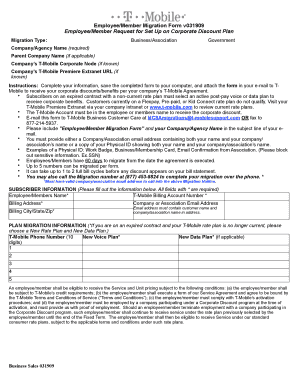
Get Download Tmobile Form V031909
How it works
-

Open form follow the instructions
-

Easily sign the form with your finger
-

Send filled & signed form or save
How to fill out the Download Tmobile Form V031909 online
This guide provides a step-by-step approach for users on how to fill out the Download Tmobile Form V031909 online effectively. Follow these instructions carefully to ensure successful completion of your form.
Follow the steps to complete the form with ease.
- Press the ‘Get Form’ button to access the form and open it in the editing interface.
- Select the appropriate migration type from the options: Business/Association or Government.
- Fill in your Company/Agency Name in the required field for identification.
- If applicable, provide the Parent Company Name to give additional context.
- Enter your Company’s T-Mobile Corporate Node information, if known, to assist with processing.
- If familiar, include your Company’s T-Mobile Premiere Extranet URL in the designated field.
- In the Subscriber Information section, complete all required fields marked with an asterisk, including your Employee/Member Name, T-Mobile Billing Account Number, and Billing Address, including City, State, and Zip.
- Provide your Company or Association Email Address that includes your name and the company/association name.
- If on an expired contract, select your New Voice Plan and, if applicable, your New Data Plan.
- Review all filled information carefully for accuracy and completeness before finalizing.
- Save your completed form to your computer.
- Attach the saved form to an email and send it to T-Mobile at MCSAmigrations@t-mobilesupport.com or fax it to 877-214-5937, ensuring to include ‘Employee/Member Migration Form’ and your Company/Agency Name in the subject line.
- Keep a copy of the submitted form for your records and follow up if needed.
Get started on completing your documents online today!
0:00 0:57 How to Create Your T-Mobile ID - YouTube YouTube Start of suggested clip End of suggested clip On sign me up. Now you may be asked to verify your phone that code will be sent to you via textMoreOn sign me up. Now you may be asked to verify your phone that code will be sent to you via text message from t-mobile. Simply enter the code from the message and you'll be good to go.