Loading
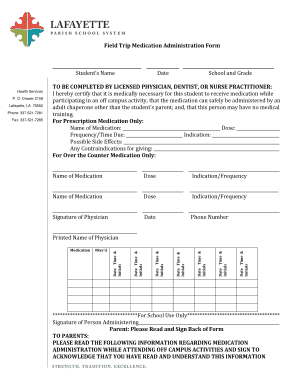
Get Field Trip Medication Administration Form - Lafayette Parish School ...
How it works
-

Open form follow the instructions
-

Easily sign the form with your finger
-

Send filled & signed form or save
How to fill out the Field Trip Medication Administration Form - Lafayette Parish School online
Completing the Field Trip Medication Administration Form is essential for ensuring the safe administration of medication to students during off-campus activities. This guide provides clear, step-by-step instructions to assist you in filling out the form online, ensuring that all necessary details are accurately recorded.
Follow the steps to complete the form accurately and efficiently.
- Press the ‘Get Form’ button to retrieve the Field Trip Medication Administration Form and open it in your editing interface.
- Enter the student's name, date, school, and grade. Ensure all details are precise, as they are crucial for identification purposes.
- For each medication the student requires, fill out the following fields: name of medication, dose, and indication/frequency. If there are multiple medications, repeat this step for each one.
- Obtain the signature of a licensed physician, dentist, or nurse practitioner in the designated area. Include the physician’s printed name, date, and phone number to validate the medication request.
- Review the section dedicated to parents, ensuring you understand the requirements listed. Complete the acknowledgment signature area, including the date and your contact number.
- Make sure all parts of the form are filled out thoroughly. Double-check for accuracy before finalizing your submission.
- Once you have completed the form, save your changes. You can then download, print, or share the completed form as needed.
Ensure the safety of your child by promptly completing the Field Trip Medication Administration Form online.