Loading
Get Aws2 United Utilities
How it works
-

Open form follow the instructions
-

Easily sign the form with your finger
-

Send filled & signed form or save
How to fill out the Aws2 United Utilities online
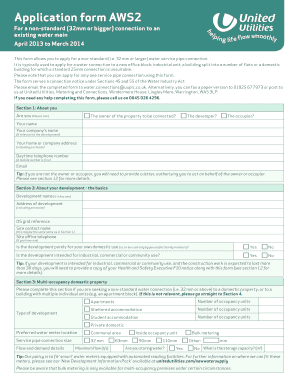
Filling out the Aws2 United Utilities form is essential for applying for a non-standard water connection to an existing water main. This guide provides a step-by-step approach to completing the form accurately and efficiently.
Follow the steps to successfully complete the Aws2 United Utilities form.
- Click the ‘Get Form’ button to access the Aws2 United Utilities form online.
- Begin with Section 1: About you. Indicate your relationship to the property by selecting one of the options provided (owner, developer, occupier) and fill in your name, the company name (if applicable), address, daytime telephone number, and email.
- Proceed to Section 2: About your development. Provide the development name, address, OS grid reference, site contact name, and confirm whether the development is for domestic, industrial, or commercial use.
- If applicable, complete Section 3 regarding multi-occupancy domestic properties. Indicate the type of development, number of occupancy units, preferred water meter location, service pipe connection size, and flow and demand details.
- For commercial or industrial premises, move to Section 4. Enter the type of development, service connection size, and flow and demand information relevant to both domestic and non-domestic uses.
- In Section 5: About your plumber, indicate whether a plumber registered with the Water Industry Approved Plumbers Scheme is being used. Provide their details if available.
- Complete Section 6 if you plan to install rainwater harvesting or grey water systems. Provide manufacturer and installer details.
- In Section 7: Fire supplies, indicate if fire sprinklers are being installed and provide relevant details.
- Section 8 covers sewer connections. Note that you will need to apply separately for sewer connections.
- In Section 9, answer questions related to land use, including contamination risks, and propose the service pipe material.
- Section 10 requires you to summarize the infrastructure charges and credits applicable based on your development's water fitting types.
- In Section 11, define the type of property for VAT calculations and confirm if required documents like location plans are included.
- Ensure that all necessary supporting documents are attached as outlined in Section 12 before submitting the form.
- Lastly, complete Section 13 by providing payment details for the application fee and wrapping up with Section 14: Declaration, verifying that all information is accurate and complete.
- Once all sections are filled out, save changes, and you may now download, print, or share the completed form.
Complete your Aws2 United Utilities application online today and ensure your water connection is processed seamlessly.
As well as our main office locations we also recruit for a variety of roles based at various locations across the North West. We have 575 wastewater treatment works and 96 water treatment works in areas from Crewe to Carlisle and a variety of field based roles where you will cover a designated area.
Industry-leading security and compliance
US Legal Forms protects your data by complying with industry-specific security standards.
-
In businnes since 199725+ years providing professional legal documents.
-
Accredited businessGuarantees that a business meets BBB accreditation standards in the US and Canada.
-
Secured by BraintreeValidated Level 1 PCI DSS compliant payment gateway that accepts most major credit and debit card brands from across the globe.