Loading
Form preview
  • US Legal Forms
  • Other Templates
  • More Forms
  • More Uncategorized Forms
  • Greenville News Weddings

Get Greenville News Weddings

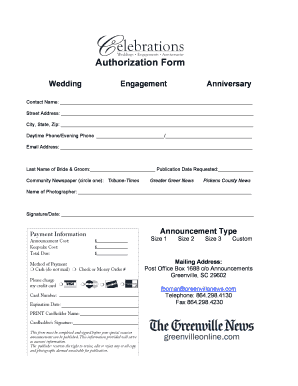
City, State, Zip: Daytime Phone/Evening Phone / Email Address: Last Name of Bride & Groom: Publication Date Requested: Community Newspaper (circle one): Tribune-Times Greater Greer News Pickens County News Name of Photographer:.

How it works

  1. Open form

    Open form follow the instructions

  2. Easily sign form

    Easily sign the form with your finger

  3. Share form

    Send filled & signed form or save

How to fill out the Greenville News Weddings online

Filling out the Greenville News Weddings form is an important step in sharing your special announcements. This guide will help you navigate the form efficiently, ensuring that all necessary information is clearly provided.

Follow the steps to complete your wedding announcement form.

  1. Press the ‘Get Form’ button to access the Greenville News Weddings form and open it for editing.
  2. Fill in the contact name field with your full name. This will be the initial point of contact regarding the announcement.
  3. Provide your complete street address, ensuring to include any apartment number if applicable.
  4. Indicate your city, state, and zip code. Accuracy in this information is essential for correspondence.
  5. Enter your daytime phone number in the first section and evening phone number in the second section, if applicable.
  6. Input your email address carefully, as this will be used for communication about your announcement.
  7. Fill out the last name of both the bride and groom in the designated field to identify the individuals involved in the announcement.
  8. Specify the publication date you would like for your announcement. This allows for proper scheduling and planning.
  9. Choose your community newspaper by circling one of the options: Tribune-Times, Greater Greer News, or Pickens County News.
  10. Provide the name of your photographer, if applicable, for additional context in your announcement.
  11. Sign and date the form where indicated to confirm all provided information is accurate and complete.
  12. Select the announcement type and size that best fits your preferences. Options available include Size 1, Size 2, Size 3, or Custom.
  13. Finally, review all filled fields for accuracy. Once confirmed, you can save the changes, download the form, print it, or share it as needed.

Ensure your wedding announcement reaches the right audience by completing the form online today.

Get form

Experience a faster way to fill out and sign forms on the web. Access the most extensive library of templates available.
Get form

Related content

Marriage Licenses - County of Greenville, SC
To avoid a wedding crisis, consider the date of your wedding, the 30 day rule, our...
Learn more
Weddings at Furman – Younts - Furman University
With its Georgian-style architecture, outdoor patios, and masterful landscaping, the...
Learn more
Wikipedia:List of online newspaper archives...
Some local public libraries subscribe to certain online newspaper archives. ... Flat River...
Learn more

Related links form

OFFICE OF THE SERGEANT AT ARMS - Senate Jeff Sessions Privacy Release Form UNITED STATES SENATOR PAT TOOMEY - Toomey Senate Permission To Publish Application Form - Smithsonian Gardens ...

Questions & Answers

Get answers to your most pressing questions about US Legal Forms API.

Contact support

Marriage notices are often found listed with the death and funeral notices. These notices are usually simple, giving just the basic of information of the names of the bride and groom and perhaps the minister who officiated. However, marriage announcements often appear in many other places in the newspaper.

Sharing your love story through the pages of a newspaper may be traditional, but it's certainly not out of style.

Ideally, wedding announcements should be printed, addressed, and stamped before the wedding so they can be mailed the day after the actual wedding. This will make sure your family and friends find out about your nuptials promptly. However, the announcements can be sent up to several months after your wedding.

Typically, wedding announcements include the couple's names, the marriage announcement, the wedding date, and the location of the celebration. For more traditional statements, planner Lisa Gorjestani of Details Event Planning explains that the hosts' names (usually the parents) are also part of the equation.

Unlike wedding invitations, which are sent before the event to invite guests, wedding announcements are sent after the wedding as a courteous way to inform people of the marital union. Mailing a wedding announcement isn't necessary, but there are a few situations where you may want to consider it.

Most couples choose to announce their wedding in local newspapers—the ones in each of their families' hometowns as well as the town where the couple now resides.

If you want to announce the wedding before the date, you'll have to be very proactive. Many newspapers have limited space and a lot of competition, so preparing the announcement well in advance for submission consideration by submitting at least three weeks before publication is ideal.

"We, [husband's first name] and [wife's first name], are pleased to announce our union. On our wedding day, we will celebrate love and life, with our family and dearest friends. We invite you to join us to celebrate this special event, on [date] at [place of ceremony], and to share with us this special day.

Get This Form Now!

Use professional pre-built templates to fill in and sign documents online faster. Get access to thousands of forms.
Get form
If you believe that this page should be taken down, please follow our DMCA take down processhere.
Get Greenville News Weddings
Get form
  • Adoption
  • Bankruptcy
  • Contractors
  • Divorce
  • Home Sales
  • Employment
  • Identity Theft
  • Incorporation
  • Landlord Tenant
  • Living Trust
  • Name Change
  • Personal Planning
  • Small Business
  • Wills & Estates
  • Packages A-Z
  • Affidavits
  • Bankruptcy
  • Bill of Sale
  • Corporate - LLC
  • Divorce
  • Employment
  • Identity Theft
  • Internet Technology
  • Landlord Tenant
  • Living Wills
  • Name Change
  • Power of Attorney
  • Real Estate
  • Small Estates
  • Wills
  • All Forms
  • Forms A-Z
  • Other Templates
  • Legal Hub
  • About Us
  • Help Portal
  • Legal Resources
  • Blog
  • Affiliates
  • Contact Us
  • Delete My Account
  • Site Map
  • Industries
  • Forms in Spanish
  • Localized Forms
  • State-specific Forms
  • Forms Kit
  • Real Estate Handbook
  • All Guides
  • Notarize
  • Incorporation services
  • For Consumers
  • For Small Business
  • For Attorneys
  • USLegal
  • FormsPass
  • pdfFiller
  • signNow
  • altaFlow
  • DocHub
  • Instapage
Form Packages
  • Adoption
  • Bankruptcy
  • Contractors
  • Divorce
  • Home Sales
  • Employment
  • Identity Theft
  • Incorporation
  • Landlord Tenant
  • Living Trust
  • Name Change
  • Personal Planning
  • Small Business
  • Wills & Estates
  • Packages A-Z
Form Categories
  • Affidavits
  • Bankruptcy
  • Bill of Sale
  • Corporate - LLC
  • Divorce
  • Employment
  • Identity Theft
  • Internet Technology
  • Landlord Tenant
  • Living Wills
  • Name Change
  • Power of Attorney
  • Real Estate
  • Small Estates
  • Wills
  • All Forms
  • Forms A-Z
  • Other Templates
Customer Service
  • Legal Hub
  • About Us
  • Help Portal
  • Legal Resources
  • Blog
  • Affiliates
  • Contact Us
  • Delete My Account
  • Site Map
  • Industries
  • Forms in Spanish
  • Localized Forms
  • State-specific Forms
  • Forms Kit
Legal Guides
  • Real Estate Handbook
  • All Guides
Prepared for you
  • Notarize
  • Incorporation services
Our Customers
  • For Consumers
  • For Small Business
  • For Attorneys
Our Sites
  • USLegal
  • FormsPass
  • pdfFiller
  • signNow
  • altaFlow
  • DocHub
  • Instapage
Social Media
Call us now toll free:
+1 833 426 79 33
As seen in:
© Copyright 1999-2026 airSlate Legal Forms, Inc. 17 Station Street, Ste. 203, Brookline, MA 02445
  • Your Privacy Choices
  • Terms of Service
  • Privacy Notice
  • Content Takedown Policy
  • Bug Bounty Program