Loading
Get Form A-1 - Burlington County
How it works
-

Open form follow the instructions
-

Easily sign the form with your finger
-

Send filled & signed form or save
How to fill out the Form A-1 - Burlington County online
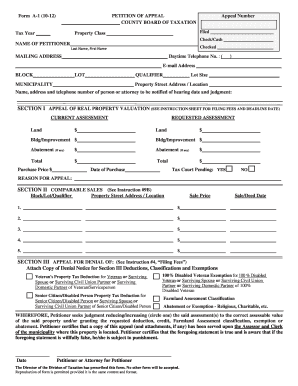
Filling out the Form A-1 - Burlington County is an essential step for those seeking to appeal their property assessment. This guide will walk you through the process of completing the form online with detailed instructions that are user-friendly and easy to follow.
Follow the steps to complete the Form A-1 online.
- Press the ‘Get Form’ button to access the form and display it in your chosen editing application.
- Begin by entering the tax year and appeal number in the appropriate fields. Ensure that you input the correct details to avoid any delays.
- Fill in your name in the specified format: last name followed by first name. Also, provide your mailing address and daytime telephone number.
- Enter your email address to ensure effective communication regarding your appeal status.
- Complete the block, lot, and qualifier information of the property for which you are appealing.
- In the section labeled 'current assessment,' list the land and building/improvement assessed values as required.
- Next, enter the requested assessment values corresponding to the land and building/improvement.
- If applicable, provide the abatement information. Be thorough to ensure accuracy in your appeal.
- Include the purchase price and date of purchase to support your appeal.
- Indicate whether there is a tax court pending by checking the appropriate box.
- In the 'reason for appeal' section, write a clear explanation for your appeal, which will be vital for your case.
- If applicable, fill in the comparable sales section, providing up to five comparable properties, their addresses, sale prices, and sale/deed dates.
- If appealing a denial, attach the relevant denial notice and indicate the type of deduction or exemption you are appealing.
- Review all sections for completeness and accuracy before finalizing the document.
- Once finished, save the changes, then download the form if necessary. You can also print it for your records or share it as required.
Complete your Form A-1 online today to ensure your appeal is submitted accurately and on time.
DNS TTL (time to live) is a setting that tells the DNS resolver how long to cache a query before requesting a new one. The information gathered is then stored in the cache of the recursive or local resolver for the TTL before it reaches back out to collect new, updated details.