Loading
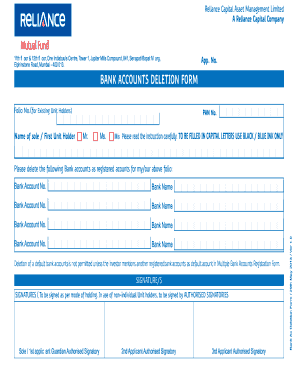
Get Bank Accounts Deletion Form - Reliance Mutual Fund
How it works
-

Open form follow the instructions
-

Easily sign the form with your finger
-

Send filled & signed form or save
How to fill out the BANK ACCOUNTS DELETION FORM - Reliance Mutual Fund online
Filling out the Bank Accounts Deletion Form for Reliance Mutual Fund is a straightforward process that allows users to remove bank account details associated with their investment folio. This guide provides clear step-by-step instructions to ensure users complete the form accurately and efficiently.
Follow the steps to successfully complete the form.
- Click ‘Get Form’ button to obtain the Bank Accounts Deletion Form and open it for editing.
- In the section labeled 'Folio No. (for Existing Unit Holders)', enter your folio number. This number helps identify your investment account within the Reliance Mutual Fund system.
- Under 'Name of sole / First Unit Holder', provide the full name of the primary account holder. Ensure that you use capital letters and black or blue ink.
- Input the PAN number in the designated field. This is essential for identification and processing your request.
- List each bank account that you wish to delete. Enter the account number and the corresponding bank name in the provided fields. If you are deleting multiple accounts, repeat this for each account.
- Before proceeding, review the note regarding the deletion of default bank accounts. Ensure you mention another registered bank account as default if needed.
- Sign the form in the space provided, using the appropriate signature method for your holding type. Ensure that the signatures match the mode of holding information on record.
- After thoroughly reviewing the entire form for accuracy, you can save changes or download a copy of the completed form. Consider printing it for your records or sharing it with relevant parties.
Complete your Bank Accounts Deletion Form online today to streamline your investment management.
Online SIP cancellation You must first login to the mutual fund website using login credentials where your SIP is continuing. ... You then select the ongoing SIP which you seek to cancel and click on 'Cancel SIP' It may take some time for your SIP to get cancelled.
Industry-leading security and compliance
US Legal Forms protects your data by complying with industry-specific security standards.
-
In businnes since 199725+ years providing professional legal documents.
-
Accredited businessGuarantees that a business meets BBB accreditation standards in the US and Canada.
-
Secured by BraintreeValidated Level 1 PCI DSS compliant payment gateway that accepts most major credit and debit card brands from across the globe.