Loading
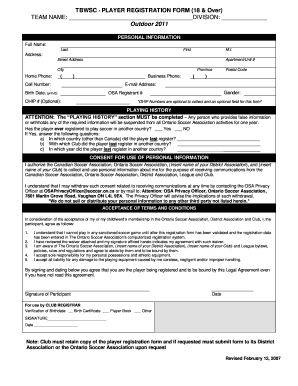
Get Tbwsc - Player Registration Form (18 & Over) Team Name ...
How it works
-

Open form follow the instructions
-

Easily sign the form with your finger
-

Send filled & signed form or save
How to fill out the TBWSC - PLAYER REGISTRATION FORM (18 & Over) TEAM NAME online
Completing the TBWSC - Player Registration Form is essential for players over 18 wishing to participate in organized soccer. This guide provides a clear, step-by-step approach to fill out the form correctly and ensure your registration is successful.
Follow the steps to fill out the TBWSC - Player Registration Form online.
- Click ‘Get Form’ button to obtain the form and open it in your preferred editor.
- Begin by entering your team name in the designated field. This section is critical as it identifies the team you will represent.
- Fill out the division information, specifying your division in the provided slot accurately.
- Complete the personal information section, which includes providing your full name, address (street address, apartment/unit number, city, province, postal code), and contact information (home phone, business phone, cell number, email address). Ensure all information is accurate.
- In the playing history section, confirm whether you have registered to play soccer in another country by selecting 'Yes' or 'No.' If you selected 'Yes,' provide further details regarding the country, last registered club, and the year of registration.
- Proceed to the consent for the use of personal information section. Acknowledge your consent by understanding that your personal information will be used for communication related to soccer activities.
- Sign and date the form in the designated area to confirm that you are the individual being registered.
- After you have completed all fields and reviewed your information for accuracy, save your changes, and download the completed form. You can also print or share the form as needed.
Complete your registration by filling out and submitting the necessary documents online today.
0:00 2:11 How to add a table of contents in Microsoft Word - YouTube YouTube Start of suggested clip End of suggested clip Now by going to the ribbon selecting references table of contents. And then choosing an automatic.MoreNow by going to the ribbon selecting references table of contents. And then choosing an automatic. Table an error message will appear. And a table with no. Information.
Industry-leading security and compliance
US Legal Forms protects your data by complying with industry-specific security standards.
-
In businnes since 199725+ years providing professional legal documents.
-
Accredited businessGuarantees that a business meets BBB accreditation standards in the US and Canada.
-
Secured by BraintreeValidated Level 1 PCI DSS compliant payment gateway that accepts most major credit and debit card brands from across the globe.