Loading
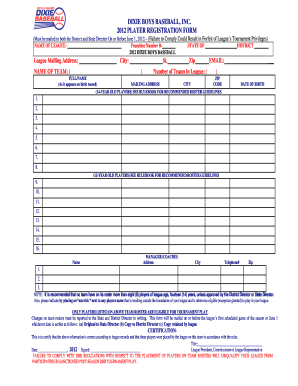
Get 2012 Dixie Boys Team Roster Form - Dixie Youth Baseball
How it works
-

Open form follow the instructions
-

Easily sign the form with your finger
-

Send filled & signed form or save
How to fill out the 2012 Dixie Boys Team Roster Form - Dixie Youth Baseball online
Completing the 2012 Dixie Boys Team Roster Form - Dixie Youth Baseball online is essential for ensuring your team's registration and eligibility. This guide provides clear, step-by-step instructions to help you accurately fill out each section of the form.
Follow the steps to complete your team roster form efficiently.
- Click ‘Get Form’ button to access the 2012 Dixie Boys Team Roster Form and open it for editing.
- In the first section, enter the name of your league and franchise number. Additionally, provide the district and state information as requested.
- Fill in the mailing address for your league, including the city and zip code. Ensure this information is up to date.
- Specify the name of the team in the designated field and indicate the number of teams in the league.
- In the roster section, list the names of the players exactly as they appear on their birth records. Include the mailing address, city, and zip code for each player.
- Record the date of birth for each player, separating 14-year-old players from 13-year-old players according to the guidelines.
- Designate the manager or coaches of the team by providing their full names, addresses, and contact numbers.
- If any players reside outside the league boundaries, denote this by placing an asterisk next to their names.
- Ensure that all changes to the roster are documented and reported to the State and District Directors in writing.
- After completing the form, review all entries for accuracy. You can then save changes, download, print, or share the form as needed.
Complete your 2012 Dixie Boys Team Roster Form online today to ensure your team's participation!
Related links form
To insert a TOC in Acrobat DC: Create a TOC in Word. Save that as a PDF. Insert the TOC page into your PDF. Right-click on the page number in the TOC and select CREATE LINK. Change LINK TYPE to INVISIBLE RECTANGLE. For LINK ACTION, select GO TO A PAGE VIEW. Click NEXT.