Loading
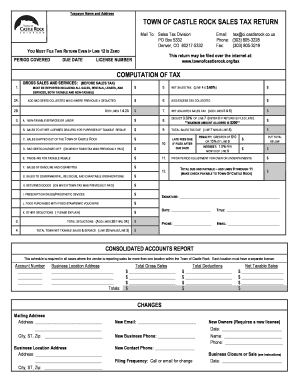
Get Town Of Castle Rock Sales Tax Return - Formsend
How it works
-

Open form follow the instructions
-

Easily sign the form with your finger
-

Send filled & signed form or save
How to fill out the TOWN OF CASTLE ROCK SALES TAX RETURN - FormSend online
Filling out the TOWN OF CASTLE ROCK SALES TAX RETURN - FormSend is essential for businesses operating in the area. This guide provides a clear, step-by-step approach to help you complete the form accurately and efficiently online.
Follow the steps to successfully complete your sales tax return.
- Click ‘Get Form’ button to access the form and open it in your preferred editor.
- Enter your business name and address in the designated fields. Ensure this information is accurate, as it is crucial for communication and records.
- Locate the 'License Number' field. Input your unique license number to verify your business's registration with the town.
- In the 'Computation of Tax' section, begin with 'Gross Sales and Services'. Enter the total amount of gross sales before tax (Line 1).
- Continue to Line 2A and detail any non-taxable sales, if applicable. Provide the amounts accordingly.
- Calculate the 'Net Sales Tax' by entering the required figures in Line 5. If you collected excess tax, record that amount in Line 6.
- Line 7 requires you to calculate the total sales tax due. Include all relevant deductions and ensure all figures align.
- For deductions, follow Lines 3B through 3K for various categories including bad debts, sales to other dealers, and taxable goods. Calculate total deductions and enter the figure in the appropriate field.
- After completing the calculations, determine the 'Total Due and Payable' by adding the lines from the tax calculations. This total must be placed at the bottom of the form.
- Finally, provide your signature, date, title, and contact information. This validates your return and allows for any necessary communication regarding your filing.
- Once you've reviewed all entries for accuracy, you can save the completed form. You may choose to print it, share it, or submit it online, depending on the filing process outlined.
Complete your TOWN OF CASTLE ROCK SALES TAX RETURN online today for a streamlined filing experience.
The Town's Revenue Division is responsible for licensing businesses that operate within Town and collecting the proper amount of sales tax. Remember to file the proper tax form using the 4% rate for the Town of Castle Rock. For filing sales taxes online, please follow the Sales Tax Returns and Instructions.
Industry-leading security and compliance
US Legal Forms protects your data by complying with industry-specific security standards.
-
In businnes since 199725+ years providing professional legal documents.
-
Accredited businessGuarantees that a business meets BBB accreditation standards in the US and Canada.
-
Secured by BraintreeValidated Level 1 PCI DSS compliant payment gateway that accepts most major credit and debit card brands from across the globe.