Loading
Get Po Box 6123 Phoenix Az 85005
How it works
-

Open form follow the instructions
-

Easily sign the form with your finger
-

Send filled & signed form or save
How to fill out the Po Box 6123 Phoenix Az 85005 online
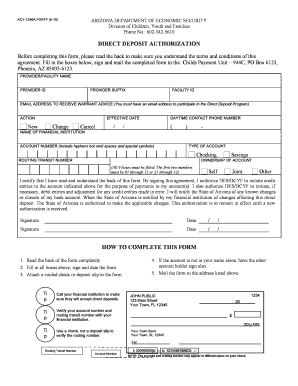
Filling out the Po Box 6123 Phoenix Az 85005 form for direct deposit authorization is an important step to ensure timely receipt of payments. This guide provides a clear, step-by-step approach to completing the form online, helping users navigate each section effectively.
Follow the steps to complete your direct deposit authorization form online.
- Click ‘Get Form’ button to obtain the form and open it in your preferred editing tool.
- Carefully read the terms and conditions provided on the back of the form to ensure you understand your responsibilities and the effective process.
- Fill in the required fields, including the provider/facility name, provider ID, facility ID, and an email address where you can receive warrant advice.
- Select the appropriate action (new, change, or cancel) and provide the effective date in the specified format.
- Enter your daytime contact phone number so that the Department can reach you if necessary.
- Fill in the name of your financial institution, along with your account number. Ensure to include hyphens and omit spaces or special symbols.
- Choose the type of account (checking or savings) and provide the corresponding routing transit number, ensuring all nine boxes are filled correctly.
- Indicate the ownership of the account (self, joint, or other) by selecting the appropriate option.
- Review all entries for accuracy, then sign and date the form as confirmation of your understanding and agreement.
- Attach a voided check or deposit slip to the form, helping to verify your routing and account information.
- If applicable, ensure that any other account holders sign the form as well.
- Mail the completed form to the Child's Payment Unit at the specified PO Box address.
Complete your direct deposit authorization form online today and ensure your payments are received without delay.
If you have questions or concerns about your UI claim, please contact the UI client advocate at UIAClientAdvocate@azdes.gov.