Loading
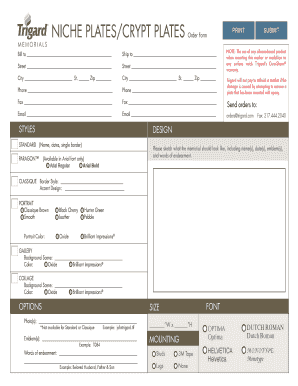
Get Niche Plates/crypt Plates Order Form - Trigard
How it works
-

Open form follow the instructions
-

Easily sign the form with your finger
-

Send filled & signed form or save
How to use or fill out the NICHE PLATES/CRYPT PLATES Order Form - Trigard online
Filling out the NICHE PLATES/CRYPT PLATES Order Form - Trigard correctly ensures that your order is processed smoothly and accurately. This guide will provide clear, step-by-step instructions to help users of all backgrounds complete the form efficiently.
Follow the steps to complete the NICHE PLATES/CRYPT PLATES Order Form with ease.
- Click the ‘Get Form’ button to obtain the form and open it in the online editor.
- In the 'Bill to' section, enter the name of the person or organization responsible for payment. Make sure to include complete address details in the corresponding fields.
- In the 'Ship to' section, fill in the recipient's name and address where the order should be delivered.
- Provide your contact information, including phone and fax numbers, to ensure you can be reached if there are questions about the order.
- Indicate the relevant email address for order confirmations and updates.
- Choose the desired styles by filling in the appropriate selections in the 'DESIGN' section. This includes selecting borders, accents, and fonts as specified in the form.
- Sketch or describe what the memorial should look like, specifying names, dates, emblems, and words of endearment in the designated fields.
- Select mounting options according to your preference by checking the appropriate boxes.
- If applicable, specify any photo(s) and emblem(s) you would like to include, ensuring that the format adheres to the examples provided.
- Review all entered information for accuracy before proceeding.
- Once completed, save your changes, and use the options to download, print, or share the NICHE PLATES/CRYPT PLATES Order Form as needed.
Complete your NICHE PLATES/CRYPT PLATES Order Form online today to ensure your order is processed correctly!
There are many online watermarking tools available, such as Canva, PicMonkey, and Watermarkly, that allow you to add a watermark to your photos without needing to any software. Simply upload your photo and add your watermark using their user-friendly interface.
Industry-leading security and compliance
US Legal Forms protects your data by complying with industry-specific security standards.
-
In businnes since 199725+ years providing professional legal documents.
-
Accredited businessGuarantees that a business meets BBB accreditation standards in the US and Canada.
-
Secured by BraintreeValidated Level 1 PCI DSS compliant payment gateway that accepts most major credit and debit card brands from across the globe.