Loading
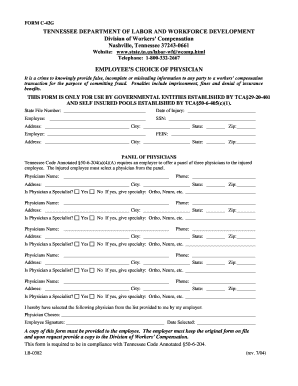
Get Employee Choice Of Physician C 42g
How it works
-

Open form follow the instructions
-

Easily sign the form with your finger
-

Send filled & signed form or save
How to fill out the Employee Choice Of Physician C 42g online
This guide provides clear and comprehensive steps to assist you in completing the Employee Choice Of Physician C 42g form online. By following these instructions, you will ensure that all necessary information is accurately submitted.
Follow the steps to successfully complete the form online.
- Click 'Get Form' button to obtain the form and open it in your editor.
- Enter the state file number at the designated section. This number is unique to your case and needs to be filled out carefully.
- Fill in the date of injury. Ensure the date is accurate, as it is crucial for your records.
- Provide your name as the employee, followed by your Social Security Number (SSN). Keep this information confidential.
- Complete your address details, including city, state, and ZIP code.
- Enter your employer's name and their Federal Employer Identification Number (FEIN). Fill in the employer's address, including city, state, and ZIP code.
- In the panel of physicians section, you will need to choose from the designated physicians listed. Fill in the name, phone number, and address for each physician.
- Indicate whether each physician is a specialist, marking 'Yes' or 'No.' If yes, specify the specialty.
- Once you have selected a physician from the list provided by your employer, write their name in the 'Physician Chosen' section.
- Sign the form as the employee and enter the date you selected the physician.
- After completing the form, ensure you save your changes, and download, print, or share the form as required.
Complete your documents online for a smooth submission process.
On the Design tab, select Watermark. Choose a pre-configured watermark, like DRAFT, CONFIDENTIAL, or DO NOT COPY. For placing a logo or image, Select Watermark > Custom Watermark > Picture watermark > Select Picture. On the same menu you can create a custom text watermark.
Industry-leading security and compliance
US Legal Forms protects your data by complying with industry-specific security standards.
-
In businnes since 199725+ years providing professional legal documents.
-
Accredited businessGuarantees that a business meets BBB accreditation standards in the US and Canada.
-
Secured by BraintreeValidated Level 1 PCI DSS compliant payment gateway that accepts most major credit and debit card brands from across the globe.