Loading
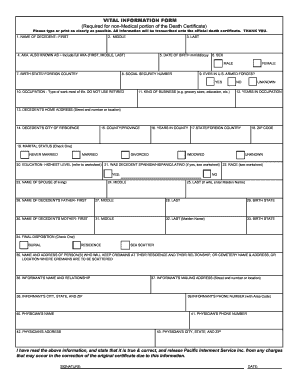
Get Vital Information Form (required For Non ... - Pacific Interment
How it works
-

Open form follow the instructions
-

Easily sign the form with your finger
-

Send filled & signed form or save
How to fill out the VITAL INFORMATION FORM (Required For Non-Medical Portion of the Death Certificate) online
Completing the VITAL INFORMATION FORM is a critical step in the documentation needed for the official death certificate. This guide provides clear, step-by-step instructions to help users accurately complete the form with the required information.
Follow the steps to fill out the form correctly.
- Press the ‘Get Form’ button to access the VITAL INFORMATION FORM. Once you have the form, ensure it is opened in a document editor where you can easily input the necessary information.
- Begin by entering the decedent's name. Fill in the first name in the designated field, followed by the middle name, last name, and any aliases under the 'also known as' section.
- Input the date of birth in the format mm/dd/ccyy. Specify the sex, selecting either male or female as applicable.
- Indicate the decedent's birth state or foreign country and provide the social security number accurately.
- Answer whether the decedent has ever served in the U.S. Armed Forces by selecting yes or no.
- Document the decedent's occupation, indicating the type of work they did most of their life without using the term 'retired.'
- Specify the kind of business the decedent was involved in, such as grocery store, education, etc. Follow this by entering the number of years they worked in that occupation.
- Provide the decedent's home address, including street and house number, city of residence, county or province, and state or foreign country along with the ZIP code.
- Select the marital status by checking one of the provided options: never married, married, divorced, widowed, or unknown.
- Next, indicate the highest education level achieved by the decedent, referring to the included worksheet for options. Follow this by noting if the decedent was of Spanish/Hispanic/Latino descent and check the relevant boxes for race.
- Fill in the name of the decedent's spouse if applicable, including first, middle, and last names. If the spouse's last name is a maiden name, note that accordingly.
- Provide the names of the decedent's parents in the specified fields and their birth states.
- Select the final disposition, such as burial, residence, or sea scatter, and provide the name and address of the person who will keep the cremains, or the cemetery name and address.
- Enter the informant's name and their relationship to the decedent, including their mailing address, city, state, and ZIP code.
- Input the physician's name, phone number, and address including city, state, and ZIP code.
- Finally, affirm that the entered information is true and correct by signing and dating the document before submission.
Complete your VITAL INFORMATION FORM online to ensure a smooth process for filing the necessary documentation.
Related links form
8 Best Sites to Download Free PDF Books Project Gutenberg. ... Open Library. ... Google Books. ... ManyBooks. ... Free-eBooks.net. ... Bookboon. ... Smashwords. ... PDFBooksWorld.