Loading
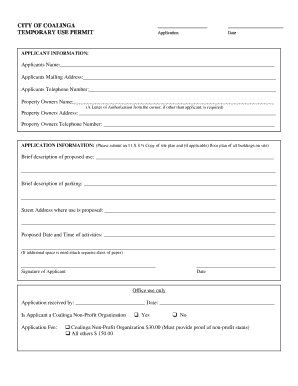
Get Temporary Use Permit - The City Of Coalinga
How it works
-

Open form follow the instructions
-

Easily sign the form with your finger
-

Send filled & signed form or save
How to fill out the Temporary Use Permit - The City Of Coalinga online
Filling out the Temporary Use Permit for the City of Coalinga online can be straightforward if you follow the provided guidance. This guide will walk you through each section of the permit, ensuring you provide all necessary information efficiently.
Follow the steps to complete your Temporary Use Permit application.
- Press the ‘Get Form’ button to access the application and open it in your preferred editing tool.
- Fill out the applicant information section, including your name, mailing address, and telephone number. If someone else is the property owner, provide their information and include a letter of authorization.
- In the application information section, submit an 11 x 8 ½ copy of your site plan and any relevant floor plans if applicable. Provide a brief description of the proposed use.
- Detail parking arrangements in the designated area. Make sure to provide clear descriptions to ensure understanding.
- Include the street address where the use is proposed, along with the proposed date and time of the activities. If you require more space for details, attach an additional sheet.
- At the bottom of the form, sign and date the application to confirm that the information provided is accurate.
- For office use, ensure that all required sections are completed, including the application received by date and whether the applicant is a Coalinga non-profit organization.
- Lastly, review the application fee section to determine the appropriate fee based on your organization status, and include the necessary payment.
- After completing the application, save your changes. You can either download the form, print it, or share it as needed.
Take the first step toward your temporary use permit — complete your application online today!
You can use the “+” symbol in place of “011” if dialing from a cell phone. The “+” sign is usually the same key as “0” on a smartphone's keypad. Some countries share a country code. For example, Canada, the United States, some places in the Caribbean, and Guam share “1” as a country code.
Industry-leading security and compliance
US Legal Forms protects your data by complying with industry-specific security standards.
-
In businnes since 199725+ years providing professional legal documents.
-
Accredited businessGuarantees that a business meets BBB accreditation standards in the US and Canada.
-
Secured by BraintreeValidated Level 1 PCI DSS compliant payment gateway that accepts most major credit and debit card brands from across the globe.