Loading
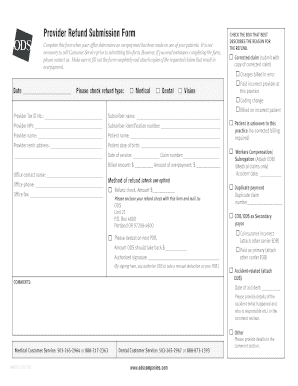
Get Provider Refund Submission Form - Ods Companies
How it works
-

Open form follow the instructions
-

Easily sign the form with your finger
-

Send filled & signed form or save
How to fill out the Provider Refund Submission Form - ODS Companies online
Filling out the Provider Refund Submission Form - ODS Companies is an essential process for offices that need to report overpayments on patient accounts. This guide will provide you with clear and detailed steps to complete the form online efficiently.
Follow the steps to successfully complete the Provider Refund Submission Form.
- Press the ‘Get Form’ button to retrieve the Provider Refund Submission Form and open it in the online editor.
- Begin by checking the box that best describes the reason for the refund. This will ensure your submission is categorized correctly.
- Indicate the type of refund by selecting one of the options: Medical, Dental, or Vision.
- Fill in the provider tax identification number and provider's NPI, which are necessary for identification purposes.
- Provide the subscriber's name and identification number, along with the provider's name and patient’s name.
- Enter the provider remit address and the patient's date of birth to clarify the services related to the refund.
- Complete the service date and claim number fields, along with the billed amount and amount of overpayment. This information is crucial for processing your refund.
- Input the office contact name and phone number to facilitate any necessary follow-up from ODS Companies.
- Select the refund method by checking the appropriate option and indicating the amount. You can choose to receive a refund check or request a deduction on your next provider deduction report.
- Affix your authorized signature in the designated area to confirm your request and authorize any necessary actions by ODS.
- Lastly, include any relevant comments, such as additional details about the accident or specific reasons impacting the refund request.
- Once you have completed the form, save your changes. You also have the option to download, print, or share the completed form as needed.
Complete your Provider Refund Submission Form online today to ensure timely processing of your refund requests.
Related links form
Industry-leading security and compliance
US Legal Forms protects your data by complying with industry-specific security standards.
-
In businnes since 199725+ years providing professional legal documents.
-
Accredited businessGuarantees that a business meets BBB accreditation standards in the US and Canada.
-
Secured by BraintreeValidated Level 1 PCI DSS compliant payment gateway that accepts most major credit and debit card brands from across the globe.