Loading
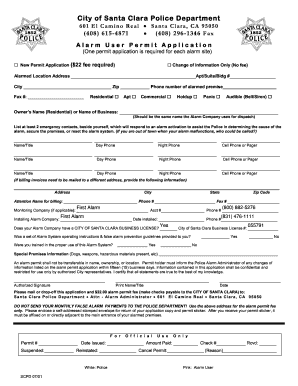
Get City Of Santa Clara Alarm Permit Application - First Alarm
How it works
-

Open form follow the instructions
-

Easily sign the form with your finger
-

Send filled & signed form or save
How to fill out the City Of Santa Clara Alarm Permit Application - First Alarm online
This guide provides comprehensive instructions for filling out the City Of Santa Clara Alarm Permit Application - First Alarm online. Whether you're applying for a new permit or updating your information, this guide will help you navigate each section with ease.
Follow the steps to complete the application accurately.
- Click the ‘Get Form’ button to access the Alarm Permit Application. This action will allow you to obtain the form and open it in your preferred digital format.
- Begin by filling in the alarmed location address, including any apartment, suite, or building numbers. Ensure that the city and zip code are also accurately provided, along with the phone number of the alarmed premises.
- Indicate whether the alarm is residential or commercial, and specify the type of alarm system you are using, such as a holdup, panic, or audible alarm.
- In the owner’s section, fill in the name of the residential owner or the business name as listed by your alarm monitoring company. This helps ensure consistency in records.
- List at least two emergency contacts who can respond to an alarm activation. Provide their names, titles, and both day and night phone numbers to ensure quick communication in case of an emergency.
- If billing invoices are to be mailed to a different address, provide the necessary billing information, including the address, city, state, zip code, attention name for billing, and contact phone number.
- Complete the information for the monitoring company if applicable, including the account number and phone number, along with the installing alarm company and installation date.
- Confirm whether your alarm company possesses a valid City of Santa Clara business license and provide any relevant license numbers.
- Indicate whether you received a set of alarm system operating instructions and were trained in the proper use of the alarm system.
- Provide any special premises information, such as the presence of dogs, weapons, or hazardous materials, as applicable.
- Finish the application by signing and printing your name and title along with the date of submission.
- After completing the form, ensure to save your changes. You can then download, print, or share the completed application as needed. Finally, submit the application along with the required fee to the designated official address.
Complete your application online today to ensure your alarm system is registered and compliant.
If the alarm user does not pay, the bill is referred to a collections agency. If a false alarm bill is referred to a collection agency, it will be subject to an additional fee. Failure to pay will affect your credit rating. You must submit proper documentation to waive a false alarm fee.
Industry-leading security and compliance
US Legal Forms protects your data by complying with industry-specific security standards.
-
In businnes since 199725+ years providing professional legal documents.
-
Accredited businessGuarantees that a business meets BBB accreditation standards in the US and Canada.
-
Secured by BraintreeValidated Level 1 PCI DSS compliant payment gateway that accepts most major credit and debit card brands from across the globe.