Loading
Get Occupancy Disclosure
How it works
-

Open form follow the instructions
-

Easily sign the form with your finger
-

Send filled & signed form or save
How to fill out the Occupancy Disclosure online
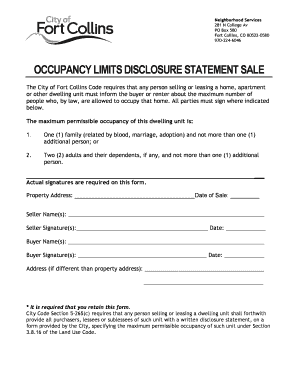
Filling out the Occupancy Disclosure is an important step for anyone selling or leasing a dwelling unit. This guide provides clear instructions on how to complete the form online, ensuring compliance with local laws regarding occupancy limits.
Follow the steps to complete the Occupancy Disclosure form accurately.
- Click ‘Get Form’ button to obtain the form and open it in the editor.
- Begin by entering the property address in the designated field, ensuring accuracy to avoid any issues during the sale or lease process.
- Next, provide the date of sale in the required section, indicating when the transaction will take place.
- Fill in the seller's name(s) in the respective field. This should reflect the legal names of the individuals or entity selling the property.
- The seller(s) must sign where indicated. Ensure that the date of the signature is also included to validate the form.
- Move on to entering the buyer's name(s) in the following section. This should include all parties who will be purchasing or leasing the property.
- Obtain the buyer's signature(s) on the form as required, noting the date of the signature for record-keeping.
- If the buyer's address is different from the property address, fill in the additional address fields with the relevant information.
- After completing all sections, review the form for accuracy and completeness.
- Finally, save changes, download the completed form, print it for physical records, or share it as necessary.
Complete the Occupancy Disclosure form online today to ensure a smooth transaction!
To obtain a use and occupancy must send email/request to uoletters@nashville.gov with building permit number and contact information. First, visit the ePermits website and enter your ten digit building permit number in the search bar (or you can search by address, owner, or contractor if you don't have your number).