Loading
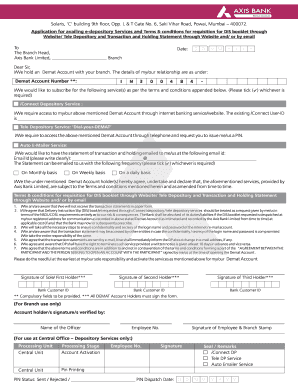
Get Iconnect Depository Service Registration Form - Axis Bank
How it works
-

Open form follow the instructions
-

Easily sign the form with your finger
-

Send filled & signed form or save
How to fill out the IConnect Depository Service Registration Form - Axis Bank online
Filling out the IConnect Depository Service Registration Form online enables users to manage their Demat account services conveniently. This guide provides step-by-step instructions on effectively completing the form to ensure a smooth registration process.
Follow the steps to complete your registration form successfully.
- Click 'Get Form' button to obtain the form and open it in the preferred editor.
- Enter the date of application in the format of day, month, and year. Ensure the date is accurate as this will be important for processing your request.
- Provide your Demat account number in the designated field. This information is crucial for identifying your account.
- Select the services you would like to subscribe to by ticking the appropriate boxes. The options include iConnect Depository Service, Tele Depository Service, and Auto Emailer Service.
- If you choose the iConnect Depository Service, input your existing iConnect User-ID in the designated area. Make sure this ID is correct as it links to your account access.
- For the Tele Depository Service option, request a PIN by following the instructions to receive it through telephone access.
- For the Auto Emailer Service, write your email address clearly in the specified format to ensure you receive transaction and holding statements.
- Select the frequency at which you would like to receive email statements by ticking your preferred option: monthly, weekly, or daily.
- Review the terms and conditions section carefully. You must agree to these terms as they govern the services provided.
- Ensure all mandatory fields, marked with an asterisk, are filled out accurately. All Demat account holders must provide their signatures.
- Once all sections are completed, save your changes, and consider downloading or printing the form for your records.
- Submit the completed form as per your preferred method outlined in the instructions, ensuring you retain a copy for your records.
Complete your IConnect Depository Service Registration Form online today for streamlined access to your Demat account.
You must submit a written application to the bank. For joint accounts, signatures of all accountholders will be needed, irrespective of a single or joint operating mode. You will have to submit your KYC (Know Your Customer) documents. These will include address proof, PAN Card, and identity documents.
Industry-leading security and compliance
US Legal Forms protects your data by complying with industry-specific security standards.
-
In businnes since 199725+ years providing professional legal documents.
-
Accredited businessGuarantees that a business meets BBB accreditation standards in the US and Canada.
-
Secured by BraintreeValidated Level 1 PCI DSS compliant payment gateway that accepts most major credit and debit card brands from across the globe.